Back in 2024 I wrote a deep dive on DNS in Entra Private Access, and it turned into one of the posts I still get the most messages about – apparently I am not the only one who finds name resolution in a ZTNA world more interesting than it has any right to be. That post was all about how names get resolved: the NRPT, the 6.6.255.254 forwarder, split DNS, and disconnected environments.
This one picks up where that left off, but on a completely different plane. Once Private DNS is in play, an internal DNS lookup is no longer just name resolution – it quietly becomes an access to the Quick Access app, and therefore something Conditional Access gets to have an opinion about. Miss that detail, and a single, well-intentioned Conditional Access setting can start prompting your users for MFA every time they resolve an internal name.
This is the first of two follow-ups:
- When DNS lookups trigger MFA – Private DNS and Conditional Access (this post)
- Private DNS segment and suffix hygiene (coming next)
Let me start with the thing that took me embarrassingly long to fully internalize: where the different pieces of Private DNS actually live.
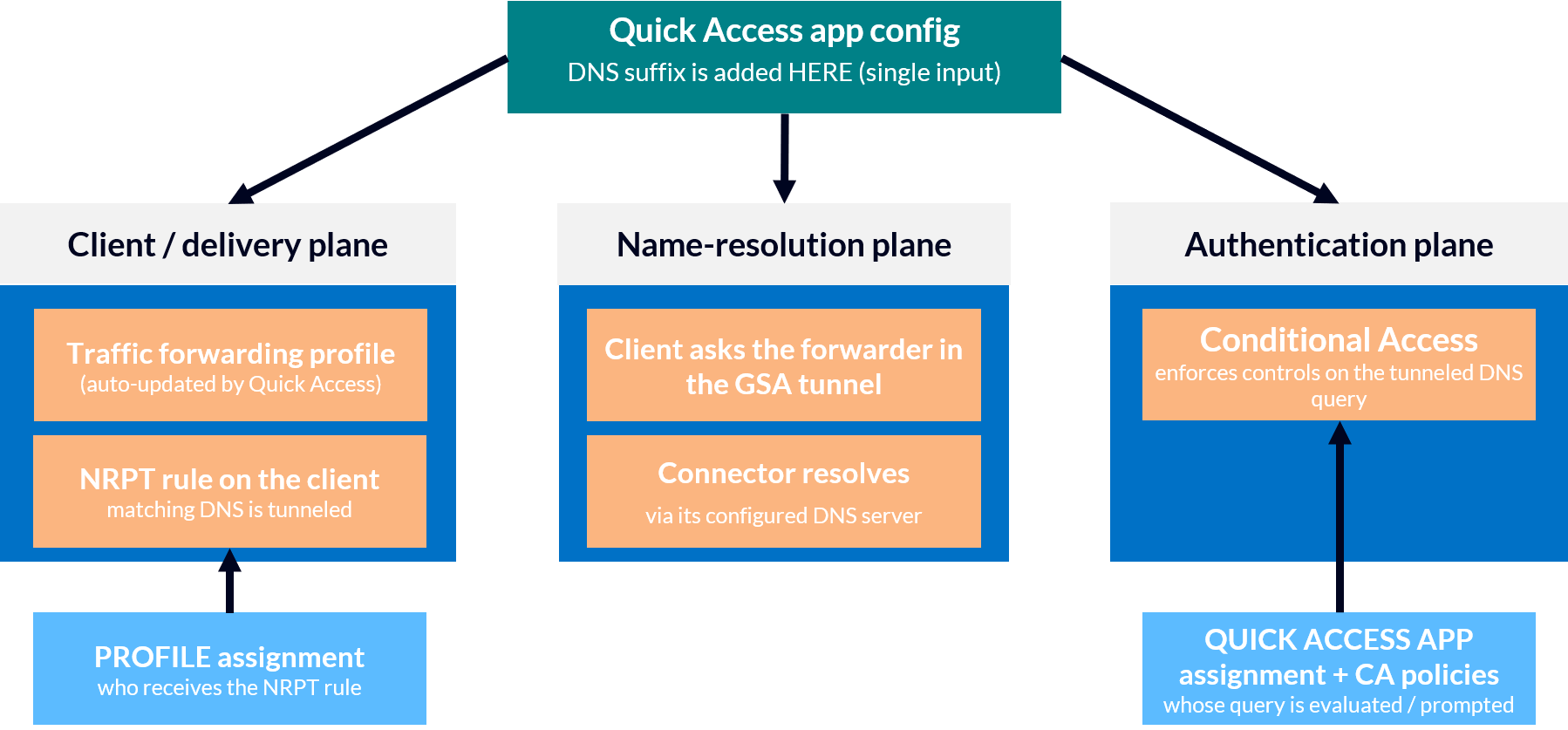
One config surface, three planes
When you set up Private DNS, everything happens in one place: the Quick Access app. You flip Private DNS on, you add your DNS suffixes, done. So it feels natural to assume that everything about Private DNS is a property of Quick Access.
It is not. That single configuration surface fans out into three different planes – and, importantly, they are not all governed by the same thing.
The client (delivery) plane. Adding a DNS suffix to Quick Access, in Microsoft’s own words, “automatically updates the traffic forwarding profile for clients”. That is the machinery from the 2024 post: an NRPT rule appears on the client (prefixed GlobalSecureAccess_) and points the matching namespace at the GSA edge. The part worth underlining is which clients get that rule – and that is every client whose user is in scope of the Private Access traffic forwarding profile. The suffix is defined under “Quick Access,” but it is delivered via the profile.
The name-resolution plane. The connector resolves the FQDN, the client is handed the real internal IP, and the traffic is steered into the tunnel. That is the topic of the 2024 post, so I won’t go into it again here.
The authentication plane. The Quick Access app is also a Conditional Access target – you can scope CA policies to it like any other application. And here is the sentence from the Microsoft VPN-replacement tutorial that the entire first half of this post hangs on: Conditional Access applied to Quick Access “will include DNS queries if Private DNS is configured”. Read that twice. It is worth being precise about the mechanism, though: each of those lookups needs an access token for the Quick Access app. While a valid token is cached, the lookup resolves silently; only when the client has to fetch a new one – the old token expired, or there is none yet – does that token request run through Conditional Access. So CA is not consulted on every lookup, but it sits squarely in the path whenever a fresh Quick Access token is issued.
So we have one configuration surface, and the pieces underneath it are governed separately. The profile assignment decides who receives the NRPT rule and therefore tunnels their DNS. Whether a given user’s tunneled DNS query then gets challenged is a matter of Conditional Access scoping – which policies target the Quick Access app (or All resources), and who those policies apply to.
 |
|---|
| Quick Access is the single configuration surface; its effects land on three planes — client/delivery (via the profile), name resolution, and authentication (Conditional Access on the Quick Access app). |
💡 This split is so easy to miss because the portal deliberately hides it. You never open the traffic forwarding profile when you add a suffix – Quick Access does it for you. But the moment you start reasoning about who is affected by a Conditional Access change, you suddenly have to keep both aspects in mind at the same time.
A DNS lookup is an access to Quick Access
Here is the claim the whole first half of this post rests on, and I will admit it took a lab to fully convince me it is literally true: with Private DNS configured, resolving an internal name is not something that happens quietly next to Global Secure Access. It is an access to the Quick Access app: resolving an internal name needs an access token for that app, exactly like any other application – and wherever a token has to be issued, Conditional Access is in the path.
The cleanest way I found to show this is to take the authorization away and watch what breaks.
So I built a test user – Bert – and assigned him to the traffic forwarding profile and to exactly one Private Access app (the one that publishes our domain controllers), but deliberately not to Quick Access. Quick Access has “assignment required” set to Yes, as it should be.
One detail about this lab matters for what follows: the Private Access apps here publish IP ranges only, no FQDN segments. So the only thing that can turn GKFELUCIADC1.gkfelucia.net into an address is Quick Access Private DNS.
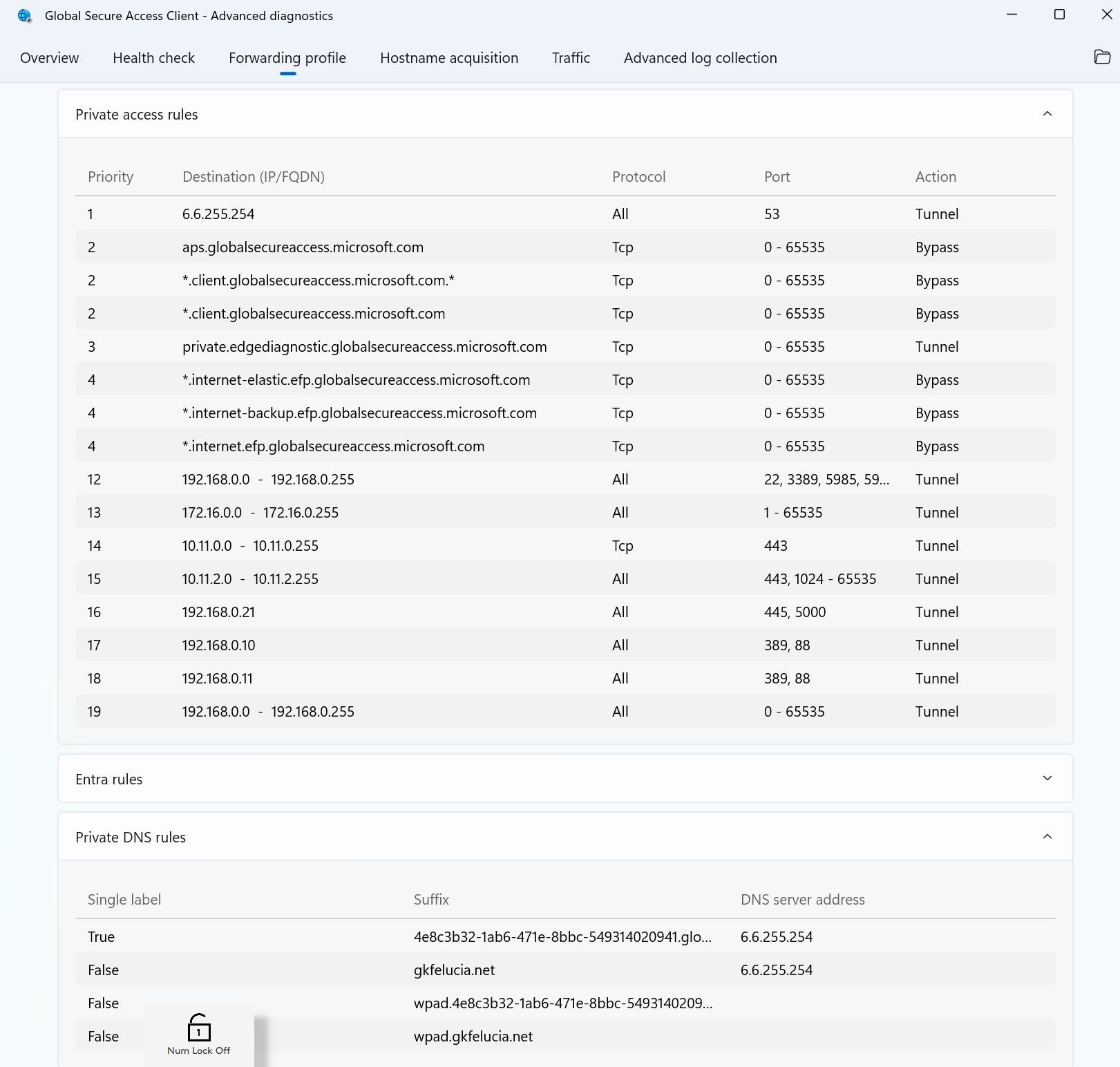
On the client, everything looks fine. The Private DNS rule for our internal namespace is sitting right there in the forwarding profile, pointing gkfelucia.net at 6.6.255.254:
 |
|---|
Bert’s client already carries the gkfelucia.net Private DNS rule, pointing at 6.6.255.254 – even though he is not assigned to Quick Access. |
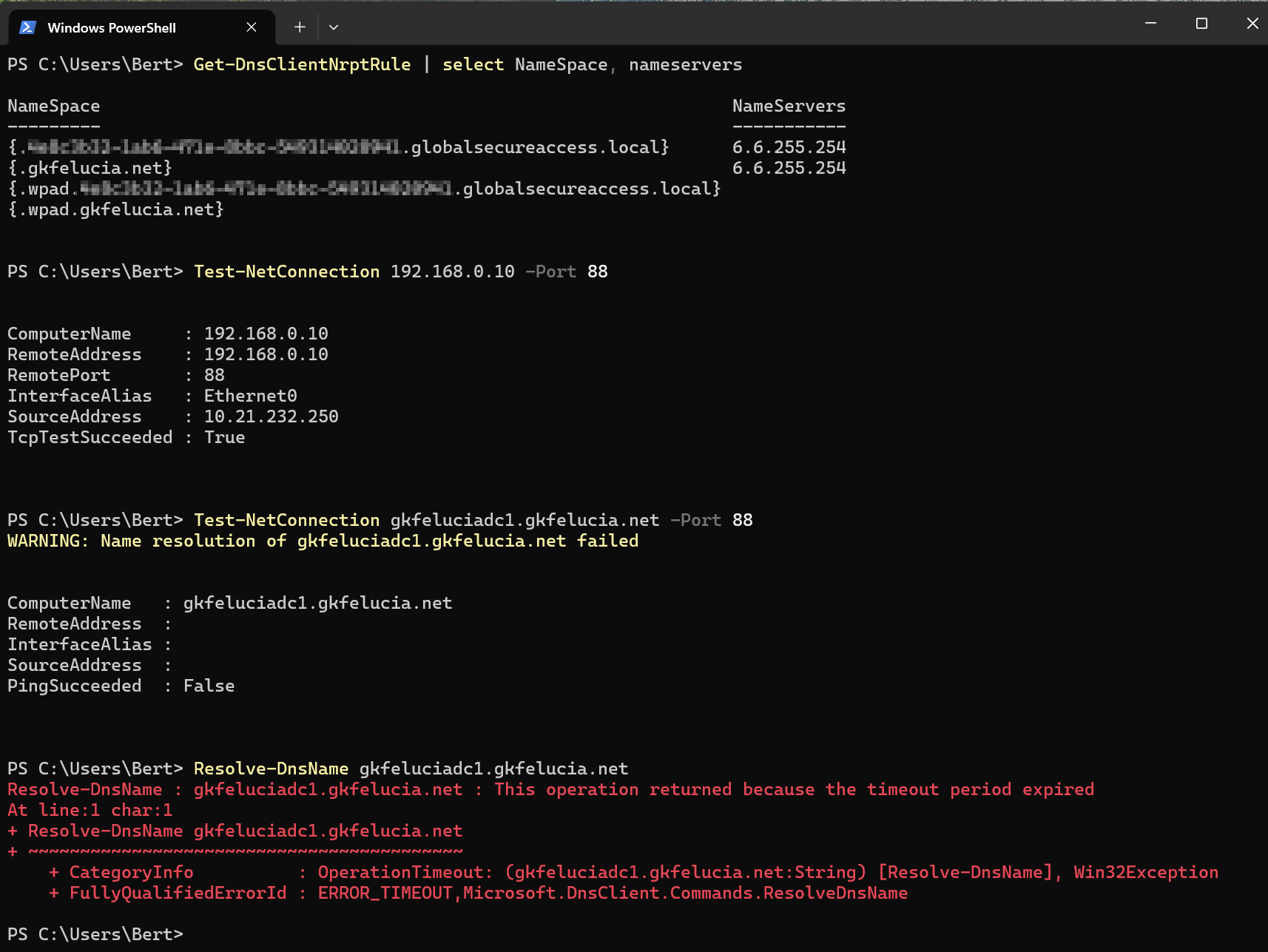
As far as the client is concerned, Bert is fully equipped to resolve internal names. He is not:
 |
|---|
The gkfelucia.net NRPT rule is present and points at 6.6.255.254 – yet Resolve-DnsName gkfeluciadc1.gkfelucia.net times out, and Test-NetConnection to the DC by name fails on resolution, while the same test by IP (192.168.0.10 -Port 88) succeeds. Bert can reach the machine; he simply cannot resolve its name. |
The lookup does not fail fast, and it does not fall back to public DNS – it disappears into the tunnel and waits to time out, because the GSA edge will not answer a Private DNS query on behalf of a user who is not allowed to use Quick Access.
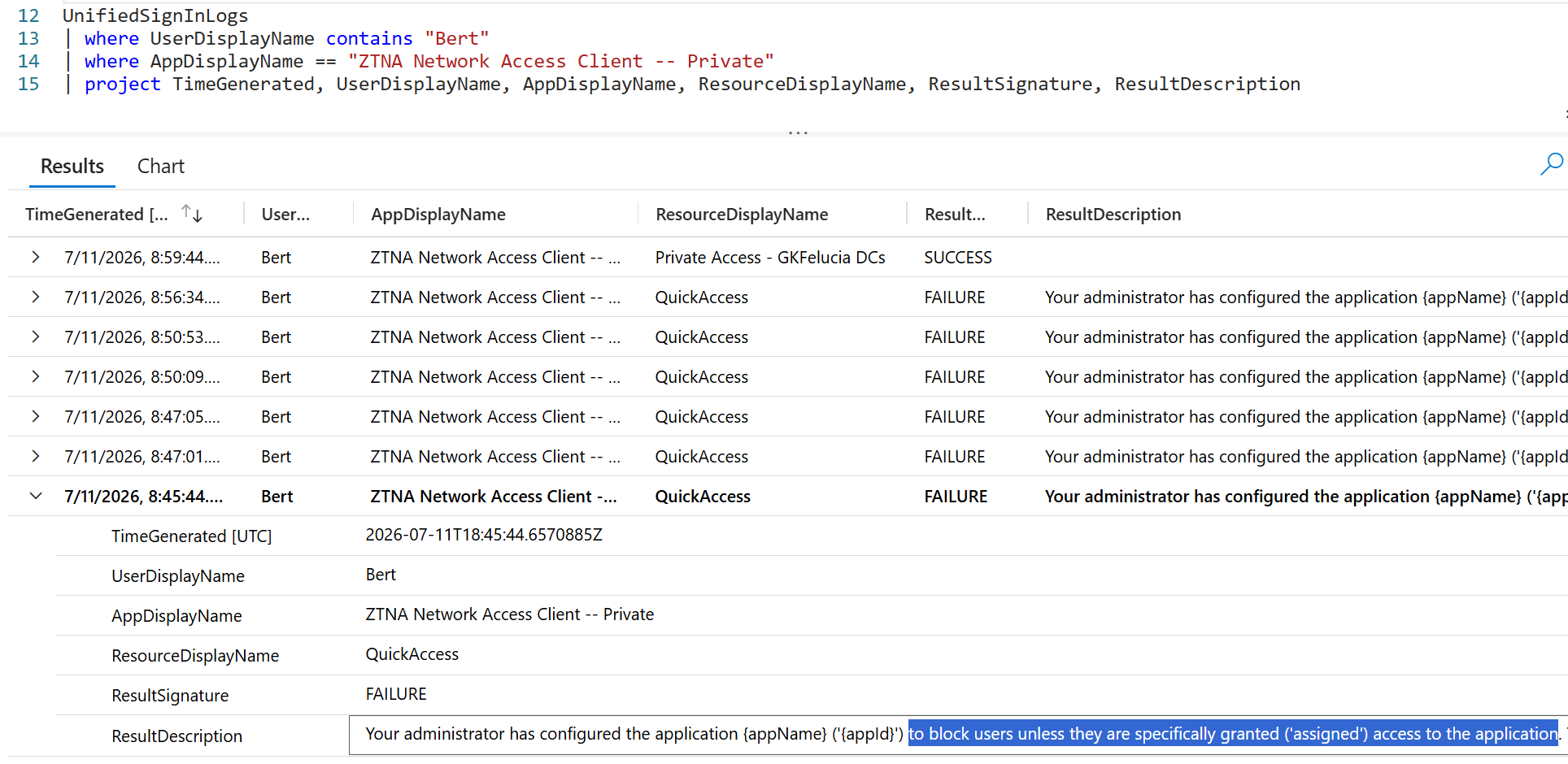
The sign-in logs are also very clear. Every single one of Bert’s name-resolution attempts turns up as a failed sign-in against the QuickAccess resource:
Your administrator has configured the application to block users unless they are specifically granted (‘assigned’) access to the application. The signed in user is blocked because they are not a direct member of a group with access, nor had access directly assigned by an administrator.
 |
|---|
| Same user, same client, same evening: every access to the QuickAccess resource fails (“not assigned”), while the one app Bert is assigned to – Private Access - GKFelucia DCs – succeeds. |
Now look at the one row in the same log that succeeded: Private Access - GKFelucia DCs, the app Bert actually is assigned to. Same user, same client, same evening – one resource lets him through, the other slams the door, and the only difference between them is app assignment. (The connection to the domain controllers themselves works perfectly well over IP, by the way – Test-NetConnection 192.168.0.10:88 comes back True – because that path is pure Private Access and never goes near Quick Access.)
So the delivery of the NRPT rule and the right to use it are two completely different things, owned by two different objects. The profile hands the rule to everyone in the Traffic Profile. Quick Access decides whose resulting query is actually allowed to resolve.
💡 This is a very unpleasant one to troubleshoot in the wild. The user has the DNS rule, the namespace looks configured, nothing is obviously wrong – and internal resolution just hangs for a few seconds and then gives up. If it does not occur to you to open the Quick Access sign-in logs, you can lose a lot of time looking in the wrong place. In my little test alone I racked up fourteen failed QuickAccess sign-ins from Bert in a single evening, most of them background name resolution – the
wpad.gkfelucia.netlookups Windows fires off on its own – rather than anything he typed.
There is one more thing worth mentioning about where this does and does not show up, and it really brings the matter into focus. Run the very same lookups as a second test user who is assigned to Quick Access – Big Bird – and everything behaves exactly as you would expect: gkfeluciadc1.gkfelucia.net resolves to its real internal IP, the DNS queries appear as tunneled UDP/53 flows in the client’s Traffic tab, and they land in NetworkAccessConnectionEvents (eighteen of them on port 53 in my capture). Bert’s attempts show up in none of those places – not Traffic, not Hostname acquisition, not NetworkAccessConnectionEvents. The only place they surface is the Entra sign-in logs.
That is exactly what you would expect once you accept what a Private-DNS lookup really is. For the assigned user the query becomes a tunneled flow and is logged like any other traffic. For Bert it is turned away at the identity layer, as a Quick Access sign-in, before there is any traffic to record at all.
One practical aside while we are in the logs: if you want the DNS detail itself – which name was queried, and whether it came back NOERROR, NXDOMAIN or FORMERR – that lives in the portal Traffic logs under Transactions, not in NetworkAccessConnectionEvents, where a lookup only shows up as a bare UDP/53 connection.
That is the first consequence of a DNS lookup being an app access: no assignment, no resolution. The second one is what this post is actually named after – because if a name lookup is a sign-in, then Conditional Access also has a say in the matter.
How a sign-in frequency ends up on Quick Access
By now the mechanism is clear: because a Private-DNS lookup is a sign-in against the Quick Access app, any Conditional Access policy that covers Quick Access is – whether you intended it or not – also a policy about your internal name resolution. Of all the controls you might attach to such a policy, a sign-in frequency is the one to watch, for reasons I will come to in the next section.
So the practical question is: How does name resolution even fall within the scope of one of these policies in the first place? There are really only two ways this can happen, and only one of them is intended.
You targeted Quick Access on purpose. You can build a Conditional Access policy for the Quick Access app directly – and if you start from the Global Secure Access portal, Entra helpfully adds the app as the target resource for you. If a sign-in frequency ends up on that policy, at least the effect on DNS is intentional, even if the side effect was not fully understood.
You caught it with a broad policy. This is the far more common case, and the one that catches people out. A policy scoped to All resources – the target formerly called All cloud apps – applies to Quick Access exactly as it does to every other application, and Conditional Access over Global Secure Access traffic works this way by design. A tenant-wide “sign in again every N hours” policy therefore silently includes your internal DNS, without anyone ever deciding that it should.
💡 All resources and All cloud apps are the same target under two names – it was simply renamed. When you audit for this, do not go looking for two different things; look for any broad policy that does not exclude Quick Access.
💡 You will spot All private resources with Global Secure Access in the sign-in logs and be tempted to treat it as a Private Access equivalent of the internet-traffic target. It is not something you can select. Microsoft is explicit that the Private Access tunnel cannot be targeted, and that you target the Private Access enterprise apps individually – there is no “Private” profile in the resource picker, only All internet resources with Global Secure Access for internet traffic.
If this happens, the fix won’t cost you anything in terms of security – but it makes far more sense once you have seen how a sign-in frequency actually behaves. So let me turn to that first.
When a DNS lookup meets a sign-in frequency
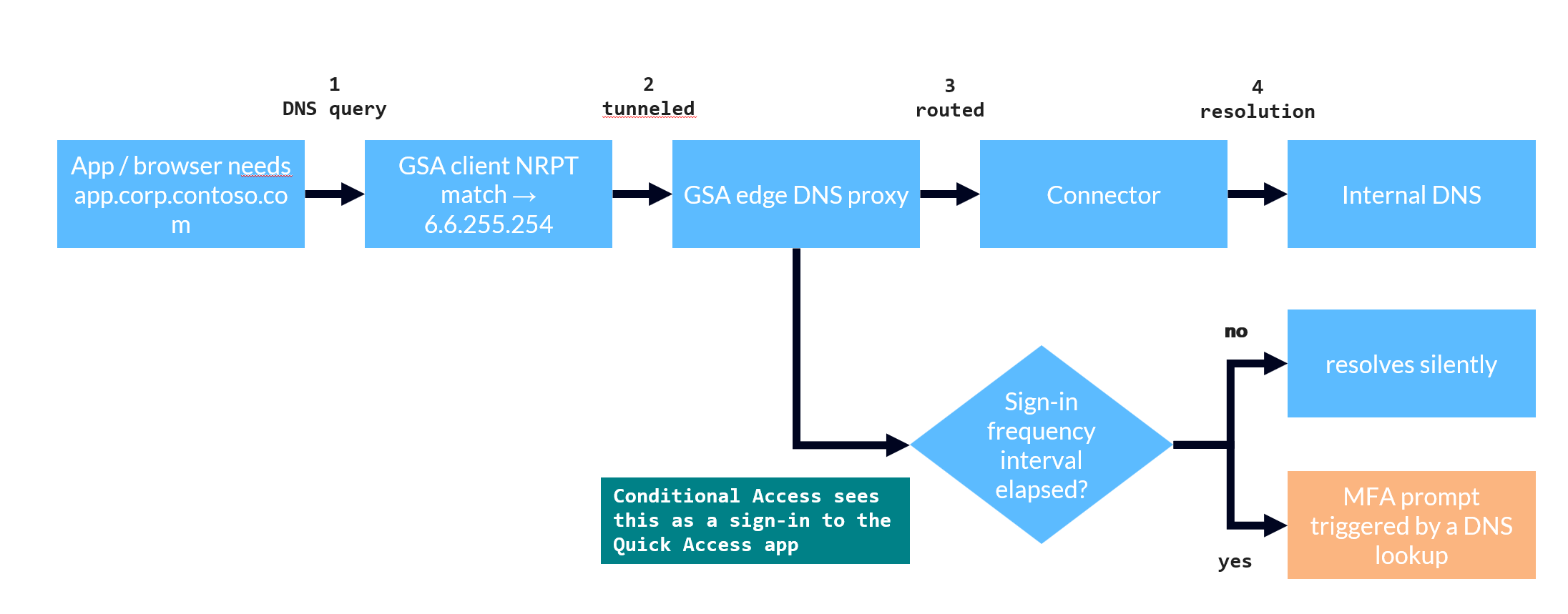
So a Conditional Access policy that covers Quick Access covers your name resolution. What that actually feels like to a user comes down to which flavour of sign-in frequency is in play — and the two behave very differently.
First, what a sign-in frequency actually measures. It is not a per-app timer. On an Entra joined or hybrid joined device, sign-in frequency is evaluated against the Primary Refresh Token: unlocking or signing in interactively refreshes the PRT (at most every four hours), and the policy compares now against that last-refresh timestamp. If more time has passed than the policy allows, the next token request forces a fresh sign-in – which refreshes the PRT and resets the clock. Two things follow. A sign-in frequency governs freshness, not access – MFA, device compliance and everything else still gate the app regardless. And because the PRT is session-wide, that freshness is shared: a reauthentication for any one resource refreshes the PRT and so satisfies the sign-in frequency of the others, up to their own windows. Keep that in the back of your mind – it is important for our decisions.
Time-based (hours or days). This is the ordinary, supported case, and Microsoft’s own Quick Access tutorial states the consequence outright: Conditional Access on Quick Access “will include DNS queries if Private DNS is configured”, and you should avoid requiring MFA with a sign-in frequency on Quick Access to avoid unanticipated MFA prompts triggered by DNS queries.
Let’s take a look at why this is a problem. As long as the interval is still valid, nothing happens. But as soon as it expires, the next internal name the device resolves is the request that needs a new token—and that’s exactly what triggers the prompt. DNS runs constantly and is almost completely invisible, so in practice the interval runs out on background traffic, not on anything the user has intentionally opened.
And this isn’t just a theoretical warning. With a one-hour sign-in frequency on Quick Access, I had a client resolving a single internal name every few seconds. Everything ran smoothly for a little over an hour, then name resolution simply stopped—the queries timed out one after another, and service was not restored until the Global Secure Access client had re-authenticated. About an hour later, the same problem occurred, triggered by nothing more than background DNS.
The timing is irregular rather than precise—re-authentication occurs on the next token refresh at or after the interval, not to the exact second—but the effect is unmistakable: a short time-based sign-in frequency on Quick Access leads to a recurring authentication prompt, and the user has no idea why they’re being prompted.
“Every time.” If the prompts bother you, the instinct might be to reach for the strongest setting and reauthenticate on every access. Today you can’t — not for this: Microsoft Entra Private Access doesn’t support setting sign-in frequency to “every time”.
That restriction is really a symptom of a broader one worth internalizing: you can’t apply Conditional Access to Private Access traffic at all — there is no Private tunnel to target, so you scope policies to the individual enterprise apps instead. Which lands us right back where we started: sign-in frequency and DNS is, and stays, a story about the Quick Access app.
 |
|---|
| A DNS query rides the tunnel to the GSA edge and is evaluated as a Quick Access sign-in; the sign-in-frequency interval decides whether it resolves silently or surfaces a prompt. |
Remediation and rollout notes
Everything above results in two practical takeaways, and each has a clean fix.
If you want people to resolve internal names, assign them to Quick Access. Since name resolution is gated by the Quick Access app, you should assign it to the users your forwarding profile covers – typically all your Entra Private Access users, perhaps minus guests and externals. You can do the assignment directly or through a group. Watch out for the enterprise-app rule that trips everyone up eventually: nested groups are not supported for app assignment. A user who only sits in a nested group is not entitled – and the symptom is not a clean error message, it is a DNS timeout, which is a lot harder to trace back to a group nesting. Use direct or dynamic membership.
If a sign-in frequency is prompting on your DNS, exclude Quick Access from that policy. Do not remove the sign-in frequency across the board, and do not carve Quick Access out of your MFA baseline – both throw away real security to fix an annoyance. Excluding the Quick Access app from the specific policy that carries the sign-in frequency leaves MFA and every other grant control exactly where they are.
Two important caveats. The exclusion does not apply exclusively to DNS: It removes the sign-in frequency for everything under “Quick Access”—for every app segment and every IP range it publishes, not just for name resolution. But that sounds worse than it is, because – as we saw – a sign-in frequency governs freshness, and freshness lives on the session-wide PRT, not on Quick Access itself. The PRT continues to run at its own pace and is updated every time the user re-authenticates, ensuring that Quick Access traffic continues to flow through a current session. You have simply prevented DNS from triggering the prompt.
There is also a practical snag worth calling out, because a colleague ran straight into it. Many of us pair the sign-in frequency with a Persistent browser session control in the same policy – and that control can only be set on a policy that targets All Cloud Apps; Entra refuses to save it otherwise. So you cannot simply add a Quick Access exclusion to that policy. The way out is the one Microsoft’s own guidance already takes: keep the two controls in separate policies. Persistent browser session stays on its own All-resources policy – it governs browser-cookie persistence, not reauthentication, so it does nothing to your DNS either way – and the sign-in frequency moves into a policy of its own, where you can exclude Quick Access.
One rollout note that is easy to miss here:
💡 When you go hunting for this – or when you validate the fix – do not filter to interactive sign-ins only. The Quick Access sign-ins driven by DNS are overwhelmingly non-interactive: background name resolution, not someone typing a URL. Most of the built-in Conditional Access workbooks show only interactive sign-ins, so they will tell you almost nothing here. I hit this often enough that I built custom Conditional Access workbooks that include the non-interactive side.
What’s next
That is the authentication side of Private DNS. The other half of the story is what you feed into Quick Access in the first place – the DNS suffixes and the application segments – because there is more room to get that subtly wrong than you would expect. The next post is about segment and suffix hygiene: why the apex of a domain does not behave like its subdomains, why a *. in front of a suffix buys you nothing while a wildcard segment quietly stands in for the suffix you forgot, and what a single-label name does to Kerberos once the synthetic suffix steps in.
And a little further out: ever since Private DNS first shipped, there has been steady feedback to make it more flexible – for instance, to use more than one connector group for different users or different domains, rather than routing all private name resolution through the single Quick Access app (a limitation I ran into back in my 2024 DNS deep dive, where exactly one Quick Access app can host the integrated resolver). If Microsoft picks that up – and I very much hope it does – I will probably have to revisit this post. But I would wager that sign-in frequency will still have a part to play: the more places private name resolution can be authorized, the more places a Conditional Access session control can quietly attach itself to your DNS.
Attribution and References
Thanks to my GSA buddies Peter Lenzke, Samuel Eng, Viktor Grzebyk and Patrick Samhaber for input, discussion and proofreading.
- Microsoft Learn: Understand Microsoft Entra Private DNS
- Microsoft Learn: Tutorial – VPN replacement with Quick Access
- Microsoft Learn: Universal Conditional Access through Global Secure Access
- Microsoft Learn: Apply Conditional Access policies to Private Access apps
- Microsoft Learn: Conditional Access – Target resources
- Microsoft Learn: Enable compliant network check with Conditional Access
- Microsoft Learn: Conditional Access adaptive session lifetime policies
- Microsoft Learn: Configure adaptive session lifetime policies
- Chris Brumm: Deep Dive DNS in Entra Private Access (2024)
- Chris Brumm: Deep Dive SSO in Entra Private Access (2024)