The previous post was about what happens to a Private DNS lookup on the authentication plane – how, once Private DNS is configured, resolving an internal name becomes an access to the Quick Access app, and therefore something Conditional Access gets an opinion about. This one is about the other half: what you feed into Quick Access in the first place – the suffixes, the application segments, the FQDNs and IP ranges.
None of what follows is a bug. Every surprise is the configuration behaving exactly as designed – just not the way the person who typed it expected – and nearly all of them come back to one thing: the order in which name resolution and traffic steering actually happen. Get the order straight and the apex, the wildcard, the suffix and the single-label name stop being mysteries and turn into consequences.
This is the second of two follow-ups to the 2024 DNS deep dive:
- When DNS lookups trigger MFA – Private DNS and Conditional Access
- Private DNS suffix and segment hygiene (this post)
The order things actually happen in
When you type a name into an application it feels like a single event: the name becomes an address and the packets go somewhere. Under Global Secure Access it is really two events, owned by two different parts of the client, and they run in a fixed order. Almost every problem in this post is a case of reasoning about one step while the surprise is hiding in the other.
Step one is name resolution: what address the application gets back. Two different mechanisms can answer, and — this is the part it took an embarrassing amount of lab testing before I properly understood it — they hand back two different kinds of address.
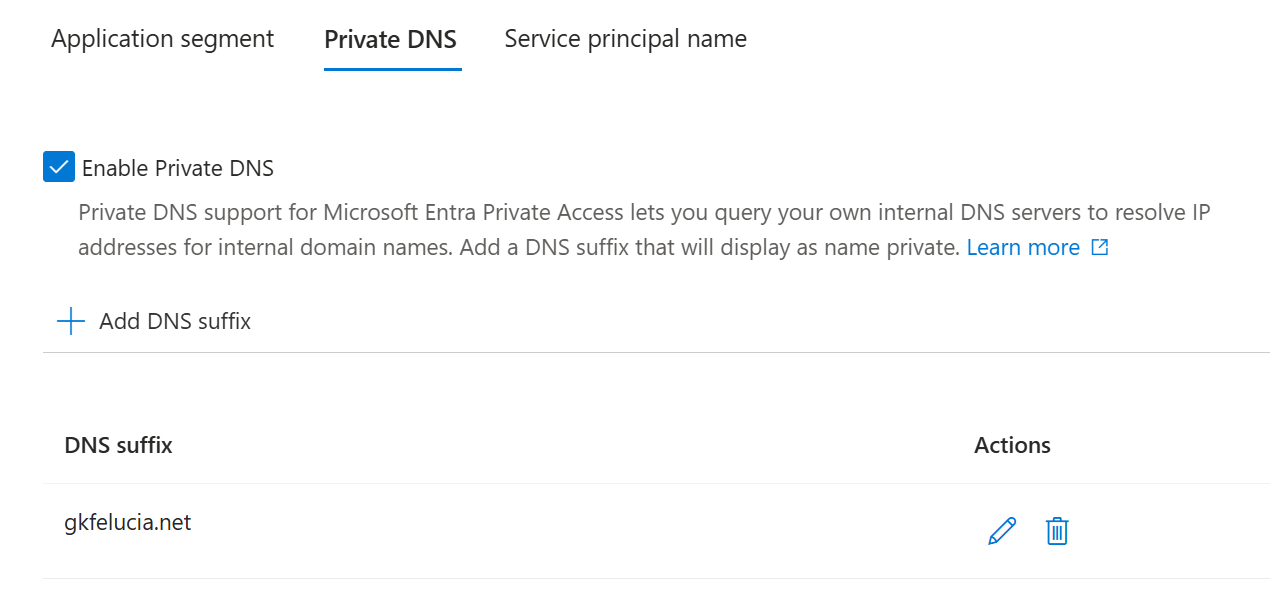
- A Private DNS suffix installs an NRPT rule that sends every matching query to the forwarder at
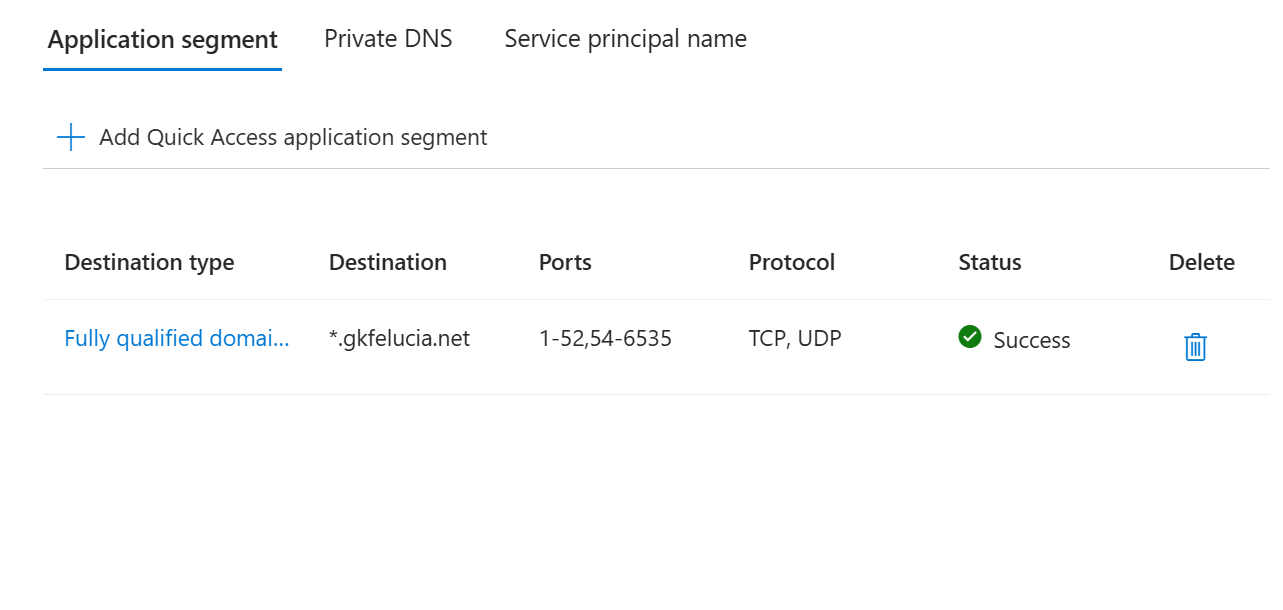
6.6.255.254– always that address – which relays it through the edge to the connector, and the connector resolves it against your internal DNS. What comes back to the application is the real internal IP: the actual192.168.x.y, with its real A and AAAA records and their real TTLs. - An FQDN application segment works the other way around. The client watches the response your normal resolver would have returned and rewrites it to a synthetic IP from the
6.6.0.xrange – “irrespective of the result,” which is exactly why an FQDN segment still resolves from a coffee-shop network where the corporate name would never answer.
The two live in different places in the portal:
 |  |
|---|---|
| Mechanism one — a Private DNS suffix, on Quick Access → Private DNS: a whole namespace. | Mechanism two — an application segment, destination type Fully qualified domain name: a specific host or a *. wildcard. |
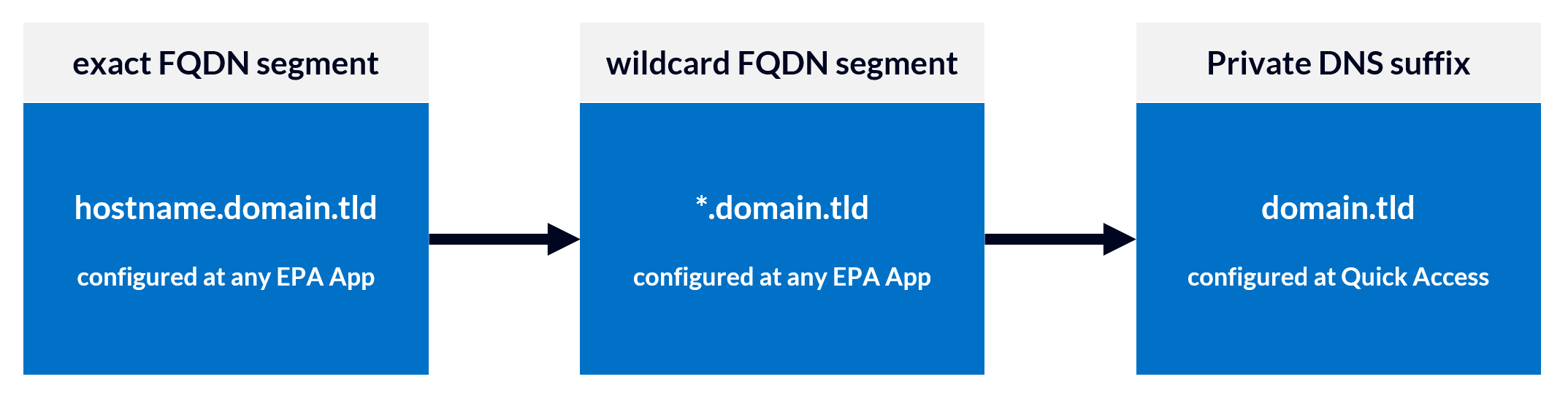
Those are not cosmetic differences; they decide everything downstream. A suffix hands you a real address and relies on an IP-range segment to catch the traffic. An FQDN segment hands you a synthetic address it recognises by name. And when more than one of these could match the same name, the more specific one wins:
 |
|---|
| Most-specific wins: exact FQDN segment › wildcard FQDN segment › Private DNS suffix. |
An exact FQDN beats a wildcard, and either FQDN segment beats a covering suffix. So the moment you publish host.contoso.com as an FQDN segment, that name resolves synthetically – even if a contoso.com Private DNS suffix sitting right next to it would have resolved it for real. Hold on to that; it is the whole of the apex and wildcard sections later.
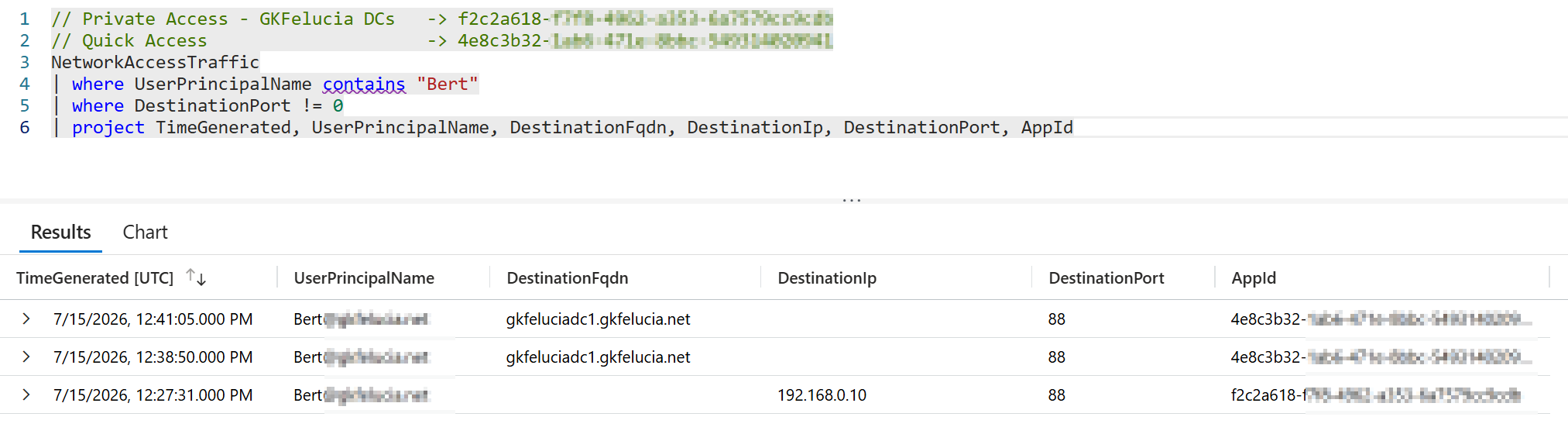
One traffic-log query shows the whole split — the same host and port, resolved two ways:
 |
|---|
Same user, same host, same port — resolved two ways. Through the suffix, the connection is logged by its real IP (192.168.0.10) and owned by the app whose IP range covers it. Through an FQDN segment, the very same name is logged by name with no IP and owned by Quick Access. One name, two mechanisms, two different apps serving one connection. |
Step two, traffic acquisition, is a separate decision. Resolving a name and tunnelling its traffic are not the same event – the docs say so outright: “after queries resolve, Global Secure Access continues with the IP/port/protocol evaluation to determine if it should acquire and tunnel the traffic.” Two consequences follow, and both bite in the field:
- A name can resolve to a perfectly good real IP and still not tunnel, because no segment covers that address (or its port). The lookup succeeds; the connection quietly goes nowhere. When a name resolves but never appears in the Traffic tab, this – not DNS – is usually why.
- Traffic can tunnel with no lookup at all, when the application already holds an IP and that IP falls in a published range. This is the mirror image, and the single most common “why is this still going through Quick Access” question I get: move an FQDN into its own app but leave its IP behind, and the name follows the new app while cached-IP traffic keeps matching the old range. Microsoft’s fix is the rule worth memorising – move the FQDN and the IP addresses it resolves to together – and the reason it is necessary is exactly this split between the two steps.
One precedence rule closes the loop, and it is specifically about IP addresses: when a per-app enterprise application and Quick Access both cover the same IP, the specific app wins – “no traffic to the segmented application goes through Quick Access, even if the segment remains within the ranges defined by Quick Access.”
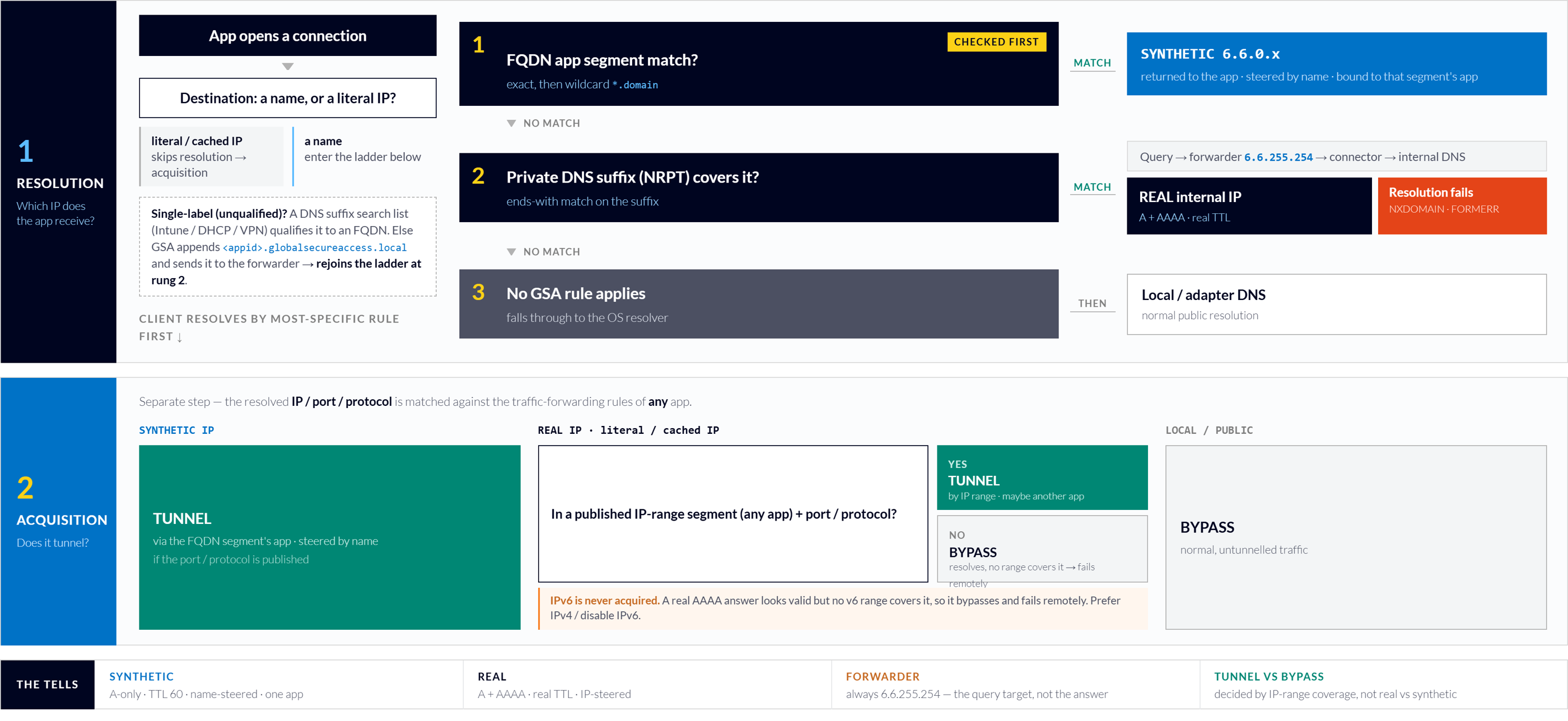 |
|---|
| The whole model on one page. Resolution (most-specific rule wins) decides which address the app gets; a separate acquisition step decides whether it tunnels at all — and the tells along the bottom are how you recognise which path you are on in the field. |
💡 Two commands keep you honest here.
Get-DnsClientNrptRuleshows every namespace the client will tunnel for resolution – including the ones you never typed. And when you test, useResolve-DnsName, which follows NRPT;nslookupignores it and will cheerfully lie to you unless you point it at the forwarder yourself withnslookup name 6.6.255.254.
There is even a step zero: a single-label name must become a full one before any rule can match it, and that qualification happens on the client, from the DNS suffix search list – the piece a VPN used to hand you for free (more in the single-label section).
With that order in hand, the rest of the post is one problem in four costumes: the namespace you think you configured and the one the client actually matches quietly disagree. It also points at the default I keep coming back to – resolve through the suffix, publish segments as IP ranges, and manage the DNS suffix search list – which the four sections below stress-test and the strategy section makes the case for.
The apex is not just another subdomain
First, the word itself, because it carries this whole section and it is more obscure than it has any right to be: the apex. The apex of a DNS zone is the bare domain name with nothing in front of it – contoso.com on its own – as opposed to a host name sitting beneath it, like dc1.contoso.com. Every zone has exactly one apex; it is where the domain’s own top-level records live; and – this is the entire point of the section – it does not behave like the hosts below it.
The most innocent-looking entry in Private DNS is your Active Directory forest root, contoso.com, and Microsoft’s own Kerberos guidance tells you to add it – “at a minimum, add the top level suffixes of your Active Directory forests.” A Private DNS suffix is an ends-with match: every FQDN that ends with it resolves through Private DNS, so contoso.com covers the apex right alongside every host beneath it.
In practice the apex does not behave like its subdomains, and the reason is what actually lives at the root of an AD-integrated zone. dc1.contoso.com is one host and answers with one address. The apex is not a host at all – it is the round-robin A set of every domain controller, and on a dual-stack forest a real AAAA besides. Remember the rule from the last section: a name resolved through the suffix comes back as its real IP and only tunnels if that IP sits inside a published IP range. Point that rule at the apex and you are no longer covering one address – you are covering the whole rotating set of DC addresses, plus an IPv6 one you almost certainly never published.
That is what turns the apex into a quiet, intermittent trap. If even one DC address sits outside your ranges, a client that round-robins onto that DC tunnels one minute and fails the next – the “it works for some people, some of the time” ticket that never reproduces on your own machine. The AAAA is worse still, because Global Secure Access does not acquire IPv6 traffic at all – “the edge works only with an IPv4 address.” A real AAAA therefore resolves perfectly and then steers the client straight past the tunnel, toward an address it can never reach. The name resolves; nothing tunnels.
Two things follow, and the first is not optional:
- Prefer IPv4 on the client. Once everything resolves to real addresses, every dual-stack host – not just the apex – can hand back an AAAA that GSA won’t tunnel. Configure the client to prefer IPv4 – the supported
DisabledComponentssetting that reorders IPv4 ahead of IPv6 without turning IPv6 off. - Cover the whole DC set. If DC locator leans on apex resolution, make sure every DC address is inside a published range, or decide deliberately that IPv6 stays out of scope.
One more option, and a tidy illustration of the ladder: publish the apex as an exact FQDN segment. It outranks the suffix, so contoso.com resolves to a single synthetic A – tunnelled by name, AAAA problem gone. The trade-off is the usual one – a synthetic answer, so use it as a routing fix, not where the name itself must be correct – but as a deliberate way to tame a misbehaving zone root it is clean.
The bottom line: add the forest-root suffix – you need it for Kerberos and DC locator – but never treat the apex as a service endpoint.
Wildcards belong on segments, not suffixes
Both a suffix and a wildcard FQDN segment can carry a *, and confusing the two is the whole of this section.
The legitimate wildcard lives on an FQDN application segment. You write it as *.contoso.com and it matches any host under that label – a.contoso.com, b.contoso.com, and deeper. It does not match the apex contoso.com itself: a *. needs at least one label to stand for, and the apex has none. That is the wildcard’s most-forgotten edge.
A Private DNS suffix only looks similar. It is already a subtree match – contoso.com catches everything ending in contoso.com, apex included – so prefixing it with *. adds nothing; there is no label slot for the * to fill. The portal may simply ignore it – or store a namespace that matches nothing. The rule is simply: *. goes on a segment, never on a suffix.
The more useful question is what a wildcard segment quietly does for you. Because it resolves every subdomain – synthetically, by the ladder from the first section – a *.contoso.com segment can stand in for a Private DNS suffix you never configured. Everything under the domain resolves, everything looks healthy, and two gaps stay hidden until they bite:
- the apex, which the wildcard doesn’t cover – so
contoso.comitself falls through to whatever suffix exists, or fails outright if none does; and - Kerberos, because those names resolved synthetically, which is the wrong name for an SPN (see the next section).
A wildcard segment that “makes DNS work” without a matching suffix is therefore not a fix but a mask. If you depend on resolving a namespace, put a suffix on Quick Access for it deliberately; reach for a wildcard segment only when you actually mean “tunnel this whole set of hosts by name” – and know it leaves the apex and Kerberos behind.
Suffixes live only on Quick Access
One structural point matters when you segment: a Private DNS suffix can only be configured on Quick Access – there is no per-app equivalent. So carving an application out of Quick Access moves its traffic – the FQDN and IP segments – but not its names: those still resolve through the Quick Access suffix, and so still depend on the Quick Access assignment. A user who has the segmented app but not Quick Access gets a working segment and a DNS timeout – the Part 1 failure mode, one object over. This is not a limitation to fight; it is why the posture in the next section keeps name resolution deliberately on Quick Access. Just make sure that assignment reaches everyone who needs to resolve a name.
Single-label names and Kerberos
Ask for a bare label – benefits, fileserver – and Global Secure Access has a specific trick for it. With Private DNS on, the client also carries an NRPT rule for a synthetic suffix, globalsecureaccess.local; it appends <appid>.globalsecureaccess.local to the label, the DNS proxy strips that suffix back off, and the connector resolves the bare name against its own search suffixes. In the lab you can watch the round trip: benefits comes back as a CNAME benefits.<appid>.globalsecureaccess.local → benefits.contoso.com, then the real IP. It means single-label names resolve even with nothing configured on the client.
The catch is the name in the middle. For a moment the system is working with benefits.<appid>.globalsecureaccess.local, a GSA-owned name with nothing to do with your Kerberos realm. For plain resolution that is invisible; for Kerberos it is fatal, and Microsoft says so outright: “GSA synthetic suffix might break Kerberos flow, so it’s recommended to use FQDN for applications that require Kerberos authentication.” An SPN is built from the name the client used, and a name wearing globalsecureaccess.local yields an SPN that doesn’t exist – the same broken-SSO territory as the 2024 SSO deep dive, reached by a fresh route. The CNAME repairs the resolution; it does nothing for the SPN.
The fix is to stop names arriving single-label in the first place. A DNS suffix search list qualifies benefits to benefits.contoso.com on the client, before the query leaves – a real FQDN that matches your suffix, tunnels like any host, and produces the correct SPN. Push it with Intune (DNS_SearchList in the Settings Catalog), ordered ahead of GSA’s own suffix so it wins. And keep the equivalent list on the connector: that is what resolves single-labels at all when a client’s list is missing or incomplete, and in a multi-domain forest it is the workhorse, growing with every namespace. The two are complementary – the connector list keeps resolution working, the client list keeps the name, and the SPN, correct.
💡 A policy-pushed search list disables devolution. If anything quietly relied on devolving the primary suffix to resolve a short name, an incomplete list breaks it the day you deploy – so enumerate every internal namespace, not just the obvious one.
A field strategy that holds up
Put the four sections together and a default falls out – the one signposted at the start: resolve every internal name through a Quick Access suffix, publish application segments as IP ranges, and manage the DNS suffix search list. It keeps the most gotchas in this post out of the environment at once. Suffix resolution returns real addresses, so Kerberos gets the right SPN, traffic logs read by real IP, and A/AAAA/CNAME/SRV records come through intact; IP segments catch that traffic by address, so cached and hard-coded IPs are covered without the “move the FQDN and its IPs” dance; and with no FQDN segments in play, nothing silently overrides a suffix with a synthetic answer.
It is a strong default, not a free one – the guardrails come with it, and the first is not optional:
- Prefer IPv4 on every client. Real resolution means real AAAA records, and GSA acquires no IPv6; without an IPv4 preference, dual-stack hosts resolve and then route past the tunnel. A prerequisite, not a tweak.
- Keep the IP ranges complete, and watch for bypass. The suffix resolves the whole namespace, but only the addresses you enumerated tunnel – a new subnet, a DHCP-assigned server, a load-balancer pool or an uncovered DC resolves fine and then silently bypasses. Treat range coverage as a maintained inventory, and monitor private traffic that leaves the tunnel.
- Guard the Quick Access assignment and its Conditional Access. Every name resolves through Quick Access, so resolution lives and dies by that one app – its group assignment (no nested groups) and its CA and sign-in-frequency posture (the whole of Part 1).
- Maintain the search list at scale. Connector-side for resolution, client-side for correct names; both grow with every domain and forest, and an incomplete list drops short names onto the synthetic-suffix path.
And mind split-DNS: a broad suffix pulls the entire zone into the tunnel, so any name that must resolve publicly needs an NRPT exclusion (as in the 2024 deep dive).
The one deliberate exception is volatile IPs. When an application’s backends move – cloud services, anything behind a churning load balancer – enumerating ranges is a losing game, and an FQDN segment is the right tool: it follows the name regardless of address. Use it there, eyes open to the synthetic trade-off, and never for Kerberos. Everywhere else, the suffix-and-IP default is the one that ages well.
Summary
Private DNS is one configuration surface with two steps behind it, run in a fixed order. Resolution decides which address the application receives – most-specific match wins (an FQDN segment over a suffix), and a suffix answers with the real IP while an FQDN segment answers with a synthetic one. Acquisition then decides, separately, whether that address tunnels at all. Every surprise in this post is that order playing out: the apex resolving to a real multi-DC set with an untunnelable AAAA; a *. that belongs on a segment, never a suffix; a wildcard segment quietly standing in for a suffix you never set; a suffix that can only live on Quick Access; a single-label name wearing globalsecureaccess.local and breaking its own SPN. The posture that heads off most of them at once runs through the whole post – resolve through the suffix, publish segments as IP ranges, manage the search list, prefer IPv4 – with FQDN segments kept for the volatile-IP, non-Kerberos exception. Together with Part 1, where a lookup became a sign-in, that is the shape of Private DNS I wish someone had drawn for me before I started.
Attribution and References
- Microsoft Learn: Understand Microsoft Entra Private DNS
- Microsoft Learn: How does DNS work with Global Secure Access? (Troubleshoot application access)
- Microsoft Learn: Configure Quick Access (application segments and Private DNS)
- Microsoft Learn: Private Access segmentation strategies
- Microsoft Learn: Use Kerberos for single sign-on with Microsoft Entra Private Access
- Microsoft Learn: Troubleshoot the Global Secure Access client – Health check (IPv4 preferred; no IPv6 acquisition)
- Microsoft Learn: Policy CSP – ADMX_DnsClient (DNS_SearchList, devolution)
- Chris Brumm: Deep Dive DNS in Entra Private Access (2024)
- Chris Brumm: Deep Dive SSO in Entra Private Access (2024)
- When DNS Lookups Trigger MFA – Private DNS and Conditional Access (Part 1)