The trigger for this post is the session “The 2026 state of advanced identity attacks” that I presented together with Eric Woodruff at the Workplace Ninja Summit in September. One of the four attacks we covered was ConsentFix, or AuthCodeFix, which I think is the better name: the attack is about the authorization code, not about consent. I’ll use AuthCodeFix from here. (The device code phishing post came out of the same session.) Since Push Security published ConsentFix at the end of 2025, it has been described many times, so I won’t add another walkthrough. Instead I look at three narrower questions: how you can see it happen, which control actually stops it, and where the existing guidance (including a post of mine from earlier this year) is out of date.
AuthCodeFix in one paragraph
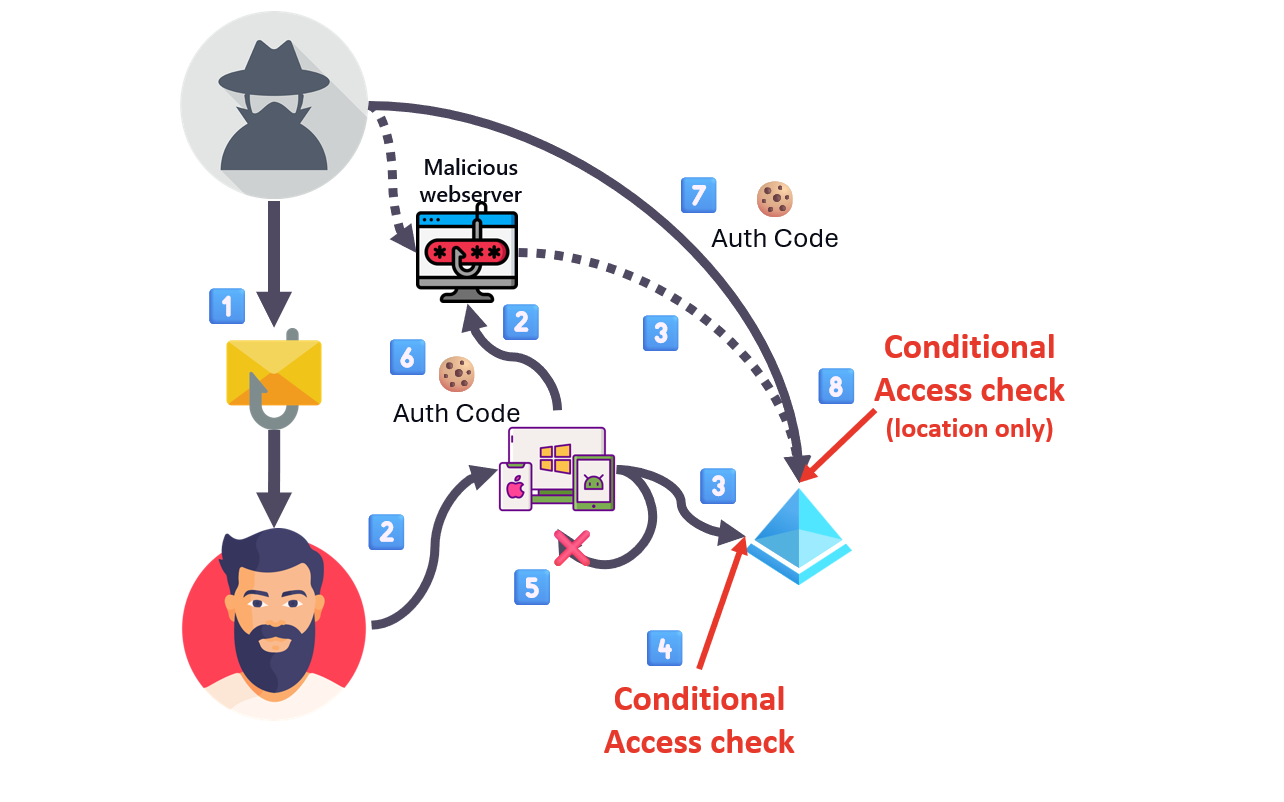
AuthCodeFix abuses a legitimate flow. The attacker builds an authorization request for a trusted
first-party client, usually Azure CLI, with a redirect_uri pointing at http://localhost. The victim
opens the link and signs in on the real Entra endpoint, MFA included. The localhost redirect then fails,
because there is no listener, and the browser shows an error page whose URL contains the authorization
code. The victim is talked into copying that URL and handing it over, and the attacker exchanges the code
for an access and a refresh token. Nothing about the authentication is faked, the victim performs it,
which is why the usual anti-phishing controls stay quiet. Fabian Bader, Thomas Naunheim and I wrote up the
technique and its mitigations at the end of 2025,
and the mechanics are covered there, in Push Security’s original research,
and in John Hammond’s video walkthrough.
The delivery is not tied to one channel. The link can arrive by email or a Teams message, and in the campaigns Push observed it came through compromised, search-ranked pages behind a fake Cloudflare Turnstile check, a browser-native trick close to ClickFix. None of this depends on getting past the mail gateway, which is one reason why the controls that matter for this attack sit at the token layer.
 |
|---|
| Picture 1: 1 attacker sends link · 2 victim clicks (or scans a QR) · 3 redirect and login (often SSO) · 4 Conditional Access check · 5 redirect to localhost, error message · 6 user transmits URL · 7 attacker sends the auth code · 8 Conditional Access check (location only). Steps 4 and 8 are the two points where the check applies. |
The one-minute handoff
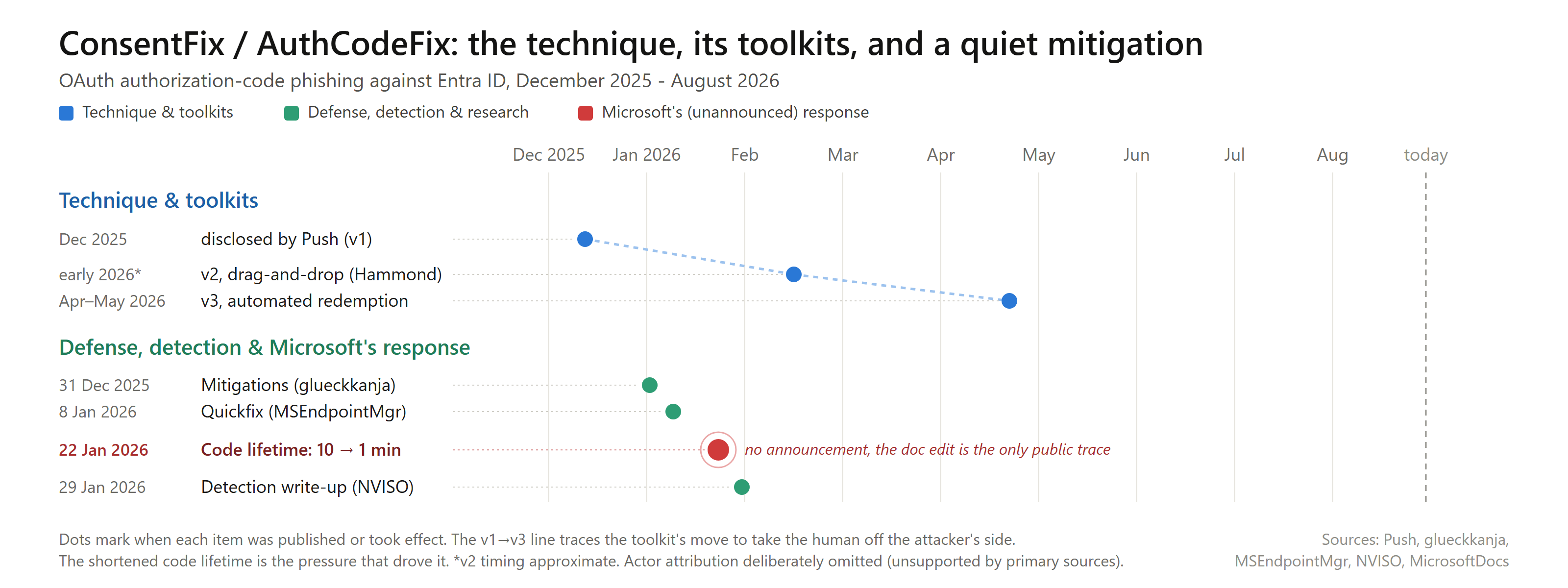
Microsoft has shortened the lifetime of an authorization code, and quietly. The identity platform documentation used to give the lifetime as about ten minutes; a documentation change merged on 22 January 2026 revised it to about one minute. I could not find an announcement anywhere (no What’s new entry, no blog post, no release note), the one-line documentation edit is all there is.
Because that is only a documented value, I measured it. In a lab tenant I redeemed codes against Azure CLI
at increasing ages: still accepted at 55, 58 and 59 seconds, then rejected at 61 and 70 with AADSTS70008
(“expired due to inactivity”). The real lifetime is a hard sixty seconds.
That minute falls on the one step that still needs a person: the handoff, the victim moving the code URL to the attacker. It happens in one of two ways. Either everything stays in the browser: the phishing page shows a form, the victim pastes the URL into it, and the exchange never leaves the tab. Or the victim sends the URL through a separate channel, most often a Teams chat, sometimes email or another messenger.
Either way, the whole sequence has to fit into a minute: the error page appears, the victim copies the URL and gets it to the attacker, and the attacker redeems it. Someone watching for a URL and pasting it into a terminal by hand does not reliably make that, which explains how the toolkits developed: the later versions take the human off the attacker’s side. That is not limited to the web form. Eric built a demo in which the attacker side of a Teams handoff is fully automated and redeems the moment the victim pastes. So the sixty seconds only hurt the fully manual case; once the attacker side is automated, they are no obstacle.
 |
|---|
| Picture 2: from Push’s first manual version through the automated toolkits, with the quietly shortened code lifetime as the pressure that drove the automation. |
💡 The access token that comes out of the redemption lives much longer: in my tests roughly 65 to 90 minutes, and every redemption also returned a refresh token.
The channel decides where you can see the attack, but not where you can block it, because the redemption is the same either way.
Detection
Take the Teams path first. The attack is visible there, but not in the obvious place. The natural hunt is to
search Teams message URLs for a localhost address carrying a code= parameter:
MessageUrlInfo
| where Url has "localhost" and Url has "code="
This finds nothing. Defender for Office 365 does not treat a localhost URL as a URL, so it never lands in
the Teams message tables. I checked this in several tenants: ordinary URLs appear in MessageUrlInfo,
localhost ones don’t.
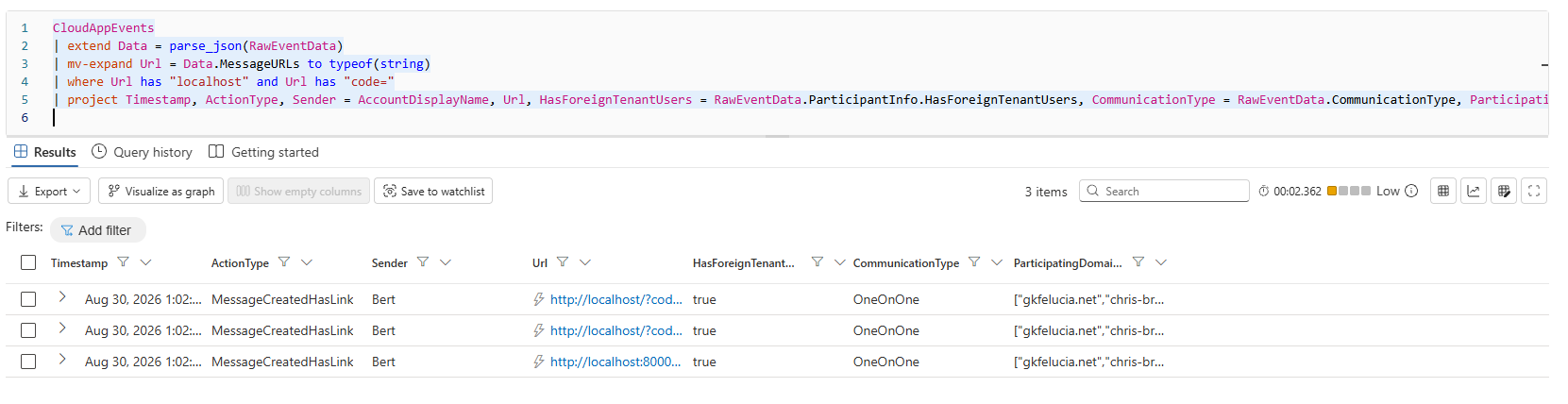
The same message in the Defender for Cloud Apps data does keep the URL. A short query over CloudAppEvents
returns the handoff with the full URL and code, and it needs nothing beyond the Defender for Cloud Apps data
that comes with an E5 Security plan:
CloudAppEvents
| extend Data = parse_json(RawEventData)
| mv-expand Url = Data.MessageURLs to typeof(string)
| where Url has "localhost" and Url has "code="
| project Timestamp, ActionType, Sender = AccountDisplayName, Url, HasForeignTenantUsers = RawEventData.ParticipantInfo.HasForeignTenantUsers, CommunicationType = RawEventData.CommunicationType, ParticipatingDomains = RawEventData.ParticipantInfo.ParticipatingDomains
 |
|---|
| Picture 3: the CloudAppEvents query returns the Teams message with the full localhost URL and code, where the mail-side tables show nothing. |
A Teams message with such a URL has no legitimate reason to exist, so the signal is clean.
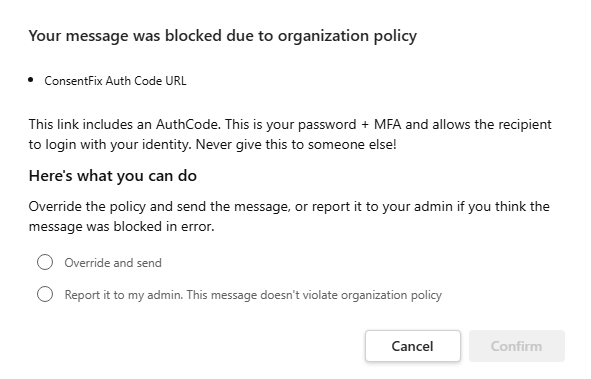
If you also have the compliance side of E5, Microsoft Purview Data Loss Prevention (DLP) can go one step further. A DLP policy for Teams with a custom sensitive information type matches the auth-code URL in the message text (Purview inspects the raw message, so the localhost address is no problem here) and blocks the message before it reaches the attacker, with a policy tip for the sender. So detecting the handoff needs E5 Security, blocking it needs the compliance licences.
 |
|---|
| Picture 4: the Teams DLP block, and the policy tip that lands at the moment of the handoff. |
The policy tip matters as much as the block: it reaches the user at exactly the moment they are about to hand over the code. This only covers Teams, though. The web-form variant and Endpoint DLP are a topic for a separate post.
On the redemption side there is a second signal, the one we described in the glueckkanja post. A single authorization leaves two sign-in events for the same session, application and user: an interactive one when the victim signs in, and a non-interactive one when the attacker redeems the code. The tell is that the two come from different IP addresses (the victim’s and the attacker’s), seconds apart. Legitimate Azure CLI use produces the same pair from a single address. The shortened code lifetime also tightens the correlation window: the original guidance allowed roughly ten minutes between the two events, now it is about one.
All of this has limits. The Teams hunt and the DLP block only cover the channel you inspect, and the sign-in correlation covers every channel, but only after the code has been redeemed. To stop the attack regardless of the channel, you need a control on the redemption itself.
What Token Protection covers
Token Protection is the control most people think of first against token theft. It binds the sign-in session token to the device it was issued on, using proof-of-possession through the Web Account Manager, so a stolen token can’t be used from another machine. Where it applies, that guarantee is cryptographic, and it is the strongest option available.
The question is where it applies. For native applications it is generally available for Exchange Online, SharePoint Online and Teams. Browser support, which I described as out of scope in April, is now in preview, but only for Azure Resource Manager (the “Windows Azure Service Management API” in Conditional Access) and a short list of web applications. Neither fits AuthCodeFix. The attack needs a pre-consented first-party public client with a localhost redirect, such as Azure CLI, Azure PowerShell, Visual Studio Code, Visual Studio or the Teams PowerShell module. The full list is on EntraScopes by Fabian Bader and Dirk-jan Mollema, which has a dedicated AuthCodeFix/ConsentFix filter. These are native clients whose tokens go to Azure Resource Manager and Microsoft Graph, which the native coverage doesn’t include, and a CLI is not one of the web apps in the browser preview. On top of that, Azure CLI belongs to a client family, so its refresh token can be exchanged for tokens of other clients in that family.
💡 PKCE doesn’t help here either, although it looks like it should. PKCE binds an authorization code to the client that started the flow, but in AuthCodeFix the attacker starts the flow and holds both the code verifier and the challenge. PKCE protects against an intercepted code, but here the victim hands the code over.
Blocking the redemption
The control that does stop AuthCodeFix is the Compliant Network check in Conditional Access. It requires that token requests reach Entra ID through the Global Secure Access service for your tenant, and blocks requests from anywhere else.
The point that is easy to miss is where the check applies in the flow. The interactive sign-in happens on the victim’s own, compliant network, so it passes, and you might expect that to be the end of it. But the redemption is evaluated as well. When the attacker exchanges the authorization code for tokens, that request is a POST to the token endpoint from the attacker’s network, and Entra ID evaluates the Compliant Network condition at that point and refuses to issue the token.
I tested it. Redeeming a captured code for a protected user from outside the GSA network, the token
endpoint returned AADSTS53003, “Access has been blocked by Conditional Access policies. The access policy
does not allow token issuance.” The same user’s requests through GSA were issued normally.
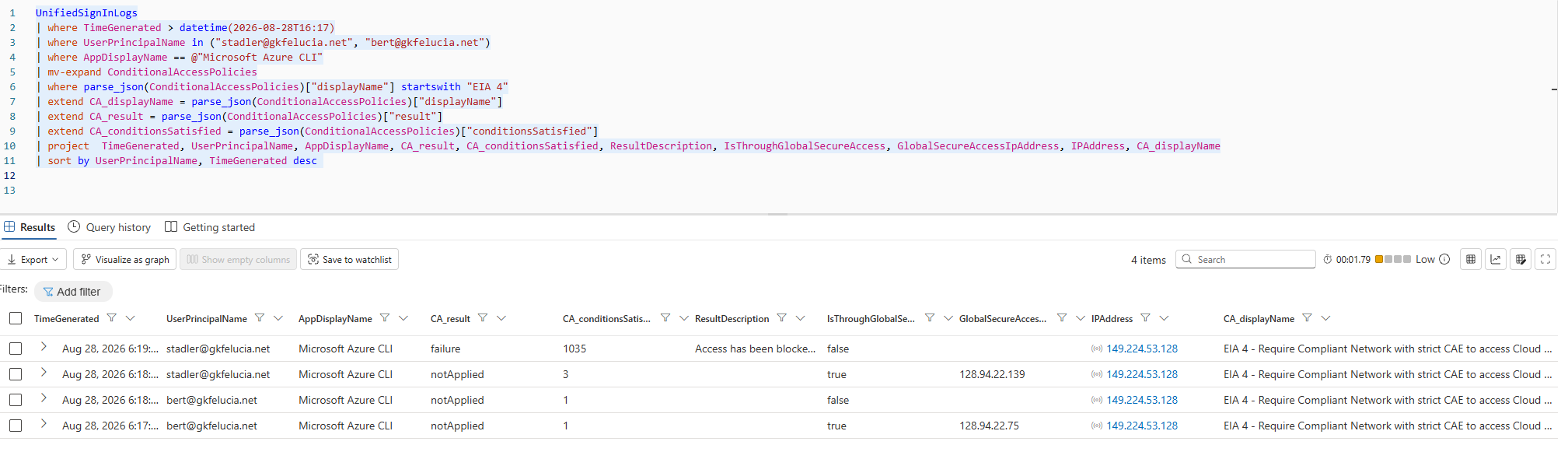 |
|---|
| Picture 5: the same user, allowed when the request comes through GSA and blocked with AADSTS53003 when it does not. |
Two details decide how far this reaches. First, it is the Compliant Network grant doing the work, not Continuous Access Evaluation. A plain “Require Compliant Network” policy without strict CAE blocks the redemption in exactly the same way, and the sign-in record shows the token was not a CAE token. CAE acts later, at the resource; this block happens at issuance. Second, it extends what I described in April for refresh token replay: the same authentication-plane enforcement that rejects a replayed refresh token also rejects the AuthCodeFix redemption. When we published the mitigations at the end of 2025, we rated the Compliant Network check as medium effectiveness. Based on this result I would rate it high where GSA is deployed, because it stops the redemption outright.
Which GSA profile you need
Rolling out a Compliant Network policy is real work (all users, the right exclusions, a staged rollout), and I covered that in the April post. What the lab result changes is one prerequisite: you don’t need the Microsoft traffic forwarding profile.
Entra’s authentication endpoints are carried by a separate system profile, “Microsoft Entra traffic”, which is on whenever any forwarding profile is active and never shows up in the portal. So any GSA profile is enough: in the lab, a user with only Entra Private Access was blocked off-GSA and allowed through it, while a user with every profile but no policy wasn’t blocked at all (the policy blocks, not the profile). The documentation says the same: it lists the GSA client and Conditional Access signaling as prerequisites, never the Microsoft traffic profile.
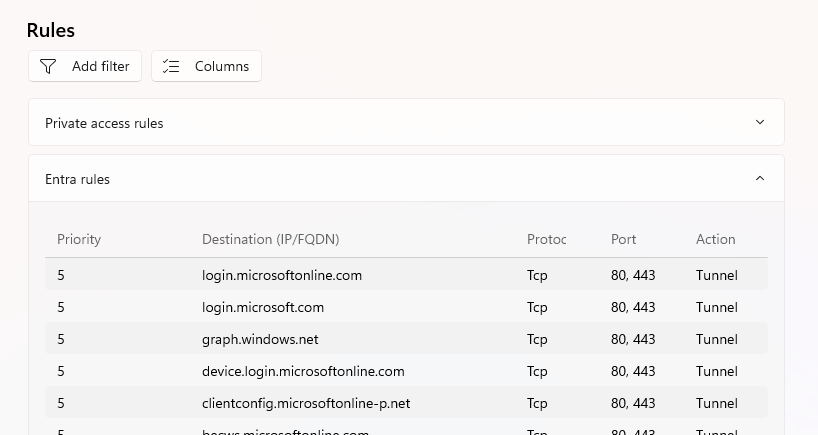 |
|---|
| Picture 6: on a Private-Access-only device, the GSA client tunnels login.microsoftonline.com through the always-on Microsoft Entra traffic rules. |
💡 I need to correct myself here: in April I wrote that the condition is satisfied “as long as the device has the client running and the Microsoft Traffic Profile active”. Any active profile does. The Microsoft traffic profile is still worth having, just not for this.
The personal-device pivot that usually saves a phishing attack does not help here either. Where the policy covers all users and resources, the victim’s sign-in from a non-compliant network is blocked just like the redemption, so there is no off-network device to fall back to.
What to do
Controls that inspect the sign-in don’t help against AuthCodeFix, because the sign-in is genuine. What stops the attack is user assignment on the abused apps (before it starts) and Compliant Network (at the redemption). Both take more work than detection, so start with that:
- Watch for it, on both sides: the
CloudAppEventshunt for Teams and the two-sign-in correlation for the redemption. This is the quickest step, and most tenants already have what it needs. With Purview DLP you can turn the Teams signal into a block. - Require user assignment on the first-party apps the attack relies on (see EntraScopes for the list). An unassigned user can’t complete the authorization at all. sentinel.blog walks through the configuration.
- Require Compliant Network in Conditional Access, for all users and all resources. It blocks the redemption and works with any GSA profile.
- Enable Token Protection where it applies, even if its reach against this attack is narrow today.
Sources
Primary research and disclosure
- Push Security — ConsentFix — original research; named the technique
- John Hammond — video analysis — hands-on demonstration of the technique and the v2 drag-and-drop handoff
- glueckkanja — ConsentFix: how a new OAuth attack bypasses Conditional Access — Fabian Bader, Christopher Brumm, Thomas Naunheim, 31 December 2025; the mitigation matrix
Microsoft Learn — authorization code and Token Protection
- OAuth 2.0 authorization code flow — code lifetime now “about 1 minute”
- entra-docs commit
da8b850— the 10 min → 1 min change, merged 22 January 2026 - Token Protection in Conditional Access — platform availability and supported resources
- Token Protection deployment guide — Web apps (preview) — browser/ARM preview scope
Microsoft Learn — Global Secure Access and Compliant Network
- Enable the Compliant Network check with Conditional Access — prerequisites: GSA client and CA signaling
- Traffic forwarding profiles — the always-on “Microsoft Entra traffic” system profile
Microsoft Learn — advanced hunting
CloudAppEventstable — keepsMessageURLs, including localhostMessageEventstable — Teams message metadata; does not record localhost URLs
Community — detection and mitigation
- NVISO — ConsentFix (a.k.a. AuthCodeFix): detecting OAuth2 authorization-code phishing
- MSEndpointMgr — ConsentFix: the quickfix
- sentinel.blog — Securing your tenant against OAuth authorisation-code theft — user-assignment hardening
- EntraScopes — Fabian Bader and Dirk-jan Mollema; first-party app explorer with an AuthCodeFix/ConsentFix filter
- valar12/ConsentFix — mitigation scripts
- Socura · Mitiga — defense-in-depth and hunting signals
Reporting and toolkit evolution
- Arctic Wolf — threat alert, dates the first observation to 11 December 2025
- CSO Online — framing as a browser-native ClickFix variant
- KnowBe4 · SC Media — delivery via the Azure CLI OAuth app and the Turnstile lure
- Push Security — ConsentFix v3: analyzing a new toolkit · BleepingComputer — v3 — the automated backend
- Ciphers Security — v3 attack chain and FOCI abuse
Own prior work
- Device Code Phishing: Prevention, Detection and Response — the companion post from the same session
- Token Replay Protection and the Compliant Network Check — the Compliant Network deployment groundwork, and the statement corrected here
MITRE ATT&CK
- T1528 — Steal Application Access Token
- T1566.002 — Spearphishing Link · T1566.003 — Spearphishing via Service