The trigger for this post is the session “The 2026 state of advanced identity attacks” that I presented together with Eric Woodruff at the Workplace Ninja Summit 2026 in September. The idea behind it: whenever one of these attacks makes the news, the same questions come up (are we vulnerable? has Microsoft fixed this? how likely is it really?), and a few weeks later they are forgotten because day-to-day business continues. So we checked where four recent Entra ID attacks stand today, from a red and a blue perspective.
Device code phishing was one of them, next to AuthCodeFix (ConsentFix), the Device Compliance Bypass and Authentication Downgrade. My preparation for it got detailed enough for a post of its own, and since my day job is on the defender side, this post is about prevention, detection and response, not about the attack mechanics. (And yes, for once this is not about Global Secure Access.)
How it works
The OAuth 2.0 device authorization grant exists for devices without a proper keyboard: conference room systems, digital signage, kiosk displays. The device shows a short code, the user types it in on microsoft.com/devicelogin, and the device receives its token.
The attack reverses the roles. The attacker starts the flow, sends the code to the victim, and the victim authenticates on the real Microsoft page. There is no fake login page, no suspicious domain, and the password never passes through the attacker. The victim completes MFA, and the attacker ends up with a valid token.
💡 This is also why the usual phishing controls, and user awareness in particular, don’t get you far here. “Don’t enter your password on a strange-looking site” does not apply when there is no strange-looking site: the user does everything right, on the genuine page.
And the token is not always the end of it: run against the Microsoft Authentication Broker (29d9ed98-a469-4536-ade2-f981bc1d605e), the same flow can yield a Primary Refresh Token (PRT) and register a device in the tenant, which turns a short-lived token into durable access (see Dirk-jan). This escalation is why the response has to remove the device and not just revoke sessions.
A short history
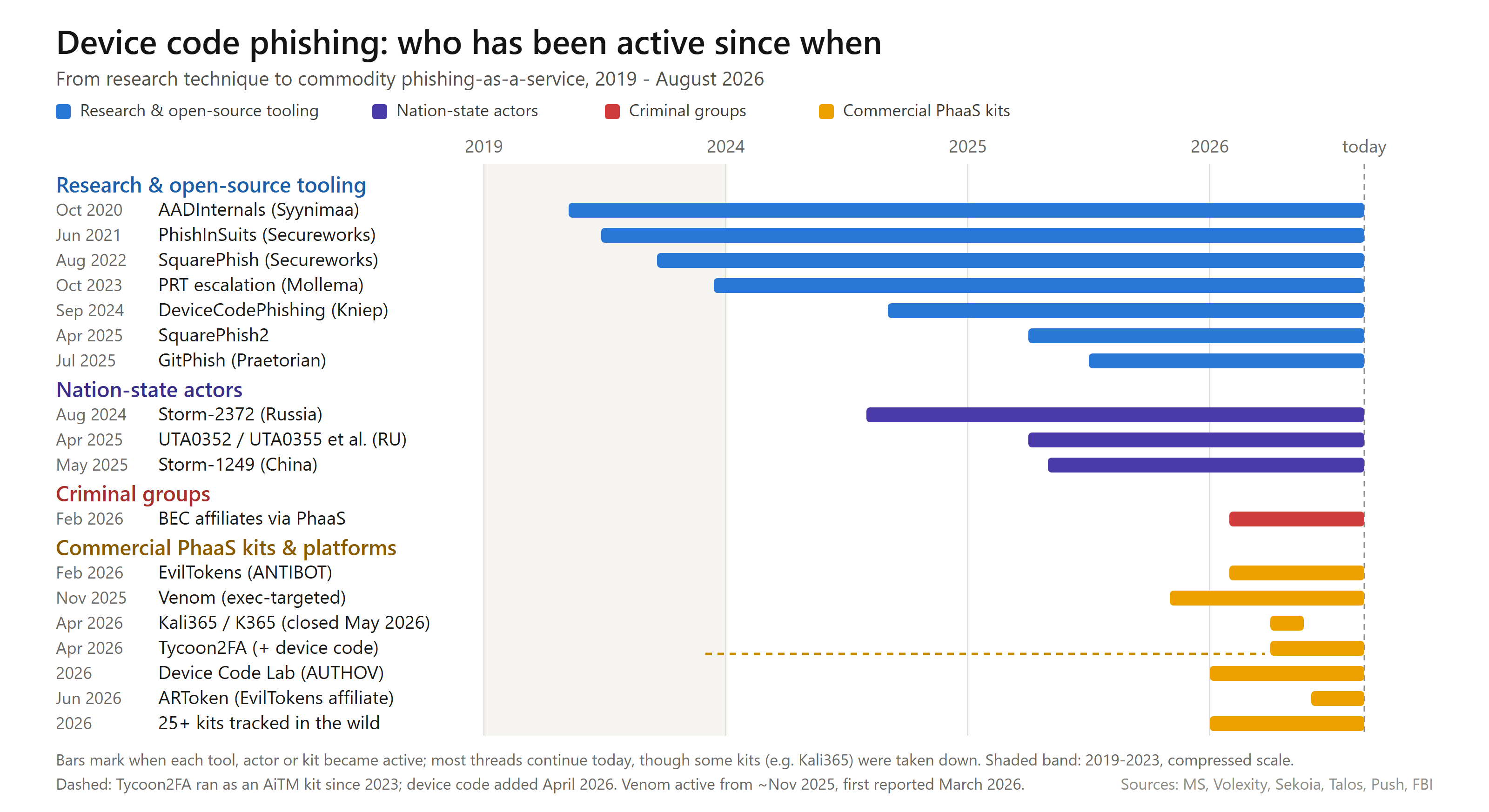
Device code phishing is not new, the technique goes back to around 2020. What has changed is who uses it, and at what scale.
 |
|---|
| Picture 1: from a research technique to commodity phishing-as-a-service. |
Roughly, there are three threads that build on each other:
- Research and open-source tooling. Abusing the device authorization grant for phishing was described by Nestori Syynimaa (AADInternals) around 2020, followed by tools like Secureworks’ PhishInSuits and SquarePhish. In 2023, Dirk-jan Mollema published the step from a phished token to a Primary Refresh Token (the escalation from above). In 2024, Dennis Kniep’s DeviceCodePhishing automated the flow with a headless browser, and in 2025 GitPhish brought the same idea to GitHub.
- Nation-state actors. In-the-wild use became visible in 2024, when Microsoft attributed an active campaign to Storm-2372 (assessed as Russia-linked). In 2025, Volexity documented several Russian actors, and Microsoft named a China-based actor (Storm-1249).
- Commodity phishing-as-a-service. This is what changed the picture in 2026. With kits like EvilTokens (and its affiliate panels), and later additions to platforms like Tycoon2FA, device code phishing turned into a product you can rent. Push Security tracks more than twenty-five distinct device code kits by now, and the FBI warned about one of them (Kali365) specifically.
The kit names change all the time, so I would not put too much weight on them. The direction is clear: what used to be a hands-on tool for a few actors can now be bought cheaply and used at scale.
Where things stand today
Delivery channels
When people think of device code phishing, they often think of Microsoft Teams, because the Storm-2372 reporting made the “Teams invite” famous. But the channels do not all carry the same weight:
- Email is the dominant channel. This is where the commodity kits deliver, and it is what you will see most of. QR codes and attachments (HTML, SVG, PDF) are not separate channels here, just ways to get the link past inspection inside a mail. Delivery from already compromised accounts is common on top of that.
- Messaging apps are the notable channel besides mail, mostly in targeted / nation-state campaigns. The Volexity campaigns ran the outreach over Signal and WhatsApp, with “live support” to walk the victim through it. Low volume, high value, and outside your corporate telemetry (personal devices, encrypted apps).
- The mobile pivot (QR, SMS) is growing, because it moves the click onto a private device, away from your endpoint and mail controls.
- Teams gets a lot of attention, but barely shows up in the data. In the environments I have looked at, very few device code URLs arrive over Teams, and none of the in-the-wild reporting I found treats it as a major channel. A good part of the “Teams invite” story is really a mail styled as a Teams invite. Teams is still a vector worth covering (see the detection part), just not the front line.
What Microsoft detects by now
Microsoft has added quite a lot since early 2026. The following alerts exist across Defender for Identity, Defender XDR and Defender for Office. Only the first three appear in the alert reference; the rest come from the blog post of 6 April 2026.
| Alert | Product | Documented |
|---|---|---|
| Anomalous OAuth device code authentication activity | Defender for Identity | Feb 2026 |
| Suspicious sign-in from an unusual user agent and IP address using device code flow | Defender for Identity | Mar 2026 |
| Anomalous token exchange following device code authentication | Defender for Identity | by Oct 2026 |
| Suspicious Azure authentication through possible device code phishing | Defender XDR | Apr 2026 |
| User account compromise via OAuth device code phishing | Defender XDR | Apr 2026 |
| User account compromised by device code phishing | Defender for Identity | Apr 2026 |
| Suspicious device code authentication following a URL click in an email from rare sender | Defender XDR | Apr 2026 |
| Device registration after potential device code phishing | Defender XDR | undocumented |
| Predelivery protection for device code phishing emails | Defender for Office | Apr 2026 |
One point that is often misunderstood: these Defender for Identity alerts do not need an on-premises MDI sensor. They are based on Entra ID sign-in behaviour and fire in cloud-only tenants as well. The prerequisite is MDI licensing for the users, not a deployed sensor.
Entra ID Protection has no dedicated device code risk detection, coverage there only comes indirectly through generic signals.
💡 The date in the documentation is not the date a detector went live. When I lined the alert names up against real telemetry, Suspicious Azure authentication through possible device code phishing had been firing about five months before it was documented. So if you look at alert volume over time without knowing when each detector went live, you read the rollout of new detectors as an escalation of the threat.
Prevention
I order the prevention measures by how much they actually help, from weakest to strongest.
1. User awareness. The weakest step for this particular attack, for the reason above. Awareness is not worthless (recognising an unexpected code request is something), but don’t expect it to carry the load.
2. Filter the transport (Defender for Office). Microsoft’s predelivery protection catches device code lures in mail, and you can build your own mail detection on top (see below). Useful, but limited to mail and known patterns. Anything that arrives over Teams, a QR code or a messaging app goes around it.
3. Block device code flow in Conditional Access. The authentication flows condition blocks the flow directly. The pattern is block with an exception: includeUsers = All, and in excludeUsers the handful of accounts that really need it (room systems), optionally narrowed further to a trusted network location. Microsoft has a dedicated guide for Teams devices.
4. Require a compliant device in Conditional Access. The strongest step. Requiring a compliant or hybrid-joined device blocks device code flow as well, although a bit indirectly: the flow runs on an unregistered device that can never satisfy the grant, so the sign-in fails with AADSTS53000. Fabian Bader put it bluntly, and I agree: as far as anyone knows, this barrier is impossible to fake, so the attacker does not get a usable token in the first place.
Two caveats to step 4:
- The device registration itself is not covered. Requiring a compliant device stops device code access to your resources, but not the device registration escalation (see Device registration and Conditional Access below).
- It is strong, but not absolute. There are ways around the compliance requirement itself, but they are their own topic and don’t change the recommendation.
💡 The steps add up, they don’t replace each other. This is especially true for the two Conditional Access policies: the block covers the device registration and PRT path, the compliant-device requirement covers access to resources. Use both.
Where the block actually takes effect
At the start, Conditional Access cannot do anything. The device authorization request contains only client_id and scope:
POST https://login.microsoftonline.com/{tenant}/oauth2/v2.0/devicecode
client_id=...&scope=user.read openid profile
No user, no identity, so there is nothing for Conditional Access to evaluate. The attacker can generate a code for any tenant, and it leaves no trace in the target’s sign-in log.
At the end, it does take effect. Conditional Access is enforced at token issuance, for device code flow the moment the polling client fetches its token (AADSTS53003: … The access policy does not allow token issuance.).
In between, the victim authenticates all the way through, password and MFA included. Whether they then see the block in the browser or the attempt only fails on the attacker’s side is not cleanly documented, the sources I found contradict each other, and I haven’t tested it yet.
So Conditional Access is a late control here. It prevents the compromise, but the social engineering has worked, the attacker learns that the target plays along, and the block is barely visible in the log (AuthenticationProtocol is not set on failure). That is why it does not replace the mail and Teams detection: the detection fires at the start of the chain, where CA cannot see anything, and CA catches what the detection missed.
Three points that are often overlooked
Report-only blocks nothing. Obvious when you say it, less obvious in reporting: in many overviews, a policy in report-only mode looks like an active one. If you measure the protection state through a policy inventory, filter on state.
A passing Maester test is not the whole picture. Test-MtCaDeviceCodeFlow checks whether an enabled policy with authenticationFlows.transferMethods = deviceCodeFlow exists that covers all users and all client app types and either blocks or requires compliant/domain-joined devices (report-only policies are correctly excluded). It does not inspect the target resources or their exclusions, so a policy passes even if it excludes the Device Registration Service (see below) or does not target all resources. And it does not look at how large excludeUsers/excludeGroups are: with six room accounts in the exception all is well, with a five-hundred-member group the passing test is worth very little.
Protocol tracking produces surprising blocks. A session that once came up via device code keeps Original transfer method = Device code flow across refreshes. As a result, later sign-ins that were not device code themselves can get blocked too, with AADSTS530036. If you suddenly see Teams clients with that error in support, this is the explanation.
💡 The policy state has a second use: if a tenant blocks device code flow, the attack cannot succeed, so a mail alert can be closed with the policy state as the justification.
Building the exception list
Before you cut that exception, you need to know who uses device code flow legitimately, otherwise you either break something or exclude too much. Successful device code sign-ins are rare, so you can look back over a long window cheaply:
SigninLogs
| where AuthenticationProtocol == "deviceCode"   // success-only, which is exactly what we want here
| extend Direction = case(
      tostring(HomeTenantId)     != "<your-tenant-id>", "inbound",   // external guest
      tostring(ResourceTenantId) != "<your-tenant-id>", "outbound",  // own user, external
                                                        "internal")
HomeTenantId against ResourceTenantId separates the three cases cleanly, much more reliably than filters on UPN patterns. What remains internal, you classify. In practice two groups stand out: room and kiosk systems (many active days, one or two IPs, only Teams apps) and admin tooling (Azure CLI, Azure PowerShell, Graph Command Line Tools against ARM, Key Vault, Storage).
The admin tooling deserves a second look. Consultants and administrators like to use az login --use-device-code because it is convenient in cross-tenant or headless situations. These accounts are typically highly privileged, so a successful phish against them is especially valuable. Don’t exempt them from the block, get the flow out of the daily routine instead: az login and Connect-AzAccount use the browser flow by default, and pipelines belong on managed identity or workload identity federation. Once you no longer need device code yourself, you can also recommend the block to customers without reservation.
Only use the non-interactive log (OriginalTransferMethod == "deviceCodeFlow") if you need to catch long-lived sessions whose original device code sign-in is older than your window (protocol tracking keeps the flag across refreshes). That table is far larger and more expensive to query.
💡 The result is your exclusion list for the Conditional Access policy and, if you build your own detection later, its allowlist as well. Put the exception on a group, not on individual accounts, otherwise new room systems are missed and the policy rots quietly.
Device registration and Conditional Access
There are two exceptions around device registration and Conditional Access that regularly get mixed up. One you configure yourself, the other Microsoft has set in the background. Both matter for device code phishing, but in different ways.
The explicit one: the Device Registration Service
Since early September 2024, Microsoft also enforces authentication flows policies on the Device Registration Service, but only for policies that target all resources. The documentation adds:
If your organization currently uses Device Code Flow for device registration purposes, and you have an authentication flows policy targeting all resources, you need to exempt the Device Registration Resource from the scope of your Conditional Access policy to avoid impact.
That is often read as a general instruction, but two conditions have to hold: an all-resources policy and actually using device code flow for registration. And its purpose is “to avoid impact”, so it is an availability note, not a security recommendation.
So if you do not use device code flow for registration (most organisations don’t), do not exclude the Device Registration Service. Then the block covers exactly the path the PRT chain runs over. The real risk is an exclusion that was set preventively just because it is in the docs: the tenant looks blocked in every overview but stays open at the one spot that turns a short-lived token into durable access.
For a review it comes down to one question: do you use device code flow for device registration? If not, why is the Device Registration Service excluded? If it really is needed, the exception sits under Target Resources → Exclude → Select excluded cloud apps → Device Registration Service (client ID 01cb2876-7ebd-4aa4-9cc9-d28bd4d359a9).
The implicit one: compliance cannot apply during registration
The second exception is not in any policy, so no administrator sees it. To enrol a device in Intune you cannot satisfy “require device to be marked as compliant”, because the device is not compliant yet at that point. So Microsoft exempts the registration path in the backend.
This is why I recommend running both policies. A compliance requirement is not a reliable backstop against the PRT chain, because the attacker registers the device on exactly the path that is exempt by design. What closes that leg is the authentication flows block (all resources, Device Registration Service not excluded). Requiring a compliant device on the device code flow itself is not a substitute, it runs into the same exemption. And in the response, the registered device object has to be removed; you cannot rely on compliance to lock it out afterwards. (How far this exemption reaches and how it can be abused more broadly is the Device Compliance Bypass from our talk, and out of scope here.)
Hardening the registration action
One more control, and a very effective one: scope a Conditional Access policy to the “Register or join devices” user action and require a phishing-resistant authentication strength (with a Temporary Access Pass for legitimate onboarding). It does not stop the token theft itself, but it stops the escalation: the phished token is based on the victim’s ordinary MFA, so it does not satisfy the requirement at registration, and the attacker gets no device and no PRT. This also helps against anything else that tries to register a device with a phished token.
Two things to keep in mind: the device setting Require Multifactor Authentication to register or join devices with Microsoft Entra has to be set to No, otherwise the user action policy is not enforced. And it does not help if the victim already used a phishing-resistant method in the device code flow, because the attacker’s token then carries exactly that.
Detection
This is where I spent most of my time. Two of the findings are about single fields in the sign-in logs, and both surprised me.
A couple of practical notes on the queries first:
- Combining the two sign-in tables. A
unionofSigninLogsandAADNonInteractiveUserSignInLogscollides on column types: you end up with_string/_dynamicsuffixes and silently empty results. Use Fabian Bader’s helper for unified sign-in logs instead of harmonising by hand. CloudAppEventsnaming. The time column isTimestampin Defender Advanced Hunting butTimeGeneratedin the Sentinel copy, and the actor isAccountObjectId, not a UPN.
Two sign-in fields
The obvious query is this:
SigninLogs
| where AuthenticationProtocol == "deviceCode"
What is not documented anywhere: this field is only set for successful sign-ins. Blocked or failed device code attempts do not show up here at all.
This observation originally comes from Fabian Bader, and it held up in real telemetry: over ninety days, this query returned only rows with ResultType 0, not a single failure.
💡 As so often, Fabian had written it down long before I looked. By now it is a running gag: whatever identity topic I start digging into, Fabian has been there before me, and his older posts often turn out to be the only, or simply the best, source for exactly the detail I need. Given how closely we work together, there is a certain irony in that.
This has two consequences:
- A tenant with a hard Conditional Access block looks identical to one where nobody ever clicked. Both show zero device code sign-ins. If you want to measure the effect of a block through this field, you measure nothing.
- A query for successful device code sign-ins needs no additional
ResultTypefilter. The filter is implicit.
The second field, OriginalTransferMethod in AADNonInteractiveUserSignInLogs, covers what happens after that first moment: if a session was built via device code, the value stays at deviceCodeFlow across token refreshes. Microsoft calls this protocol tracking.
The difference in volume is drastic. In an environment I looked at, AuthenticationProtocol == "deviceCode" produced a few hundred events over ninety days, against more than two hundred times as many for OriginalTransferMethod == "deviceCodeFlow". And in all non-interactive rows, AuthenticationProtocol is none.
The two fields answer different questions:
| Field | Question | What it shows |
|---|---|---|
AuthenticationProtocol == "deviceCode" | Did someone sign in via device code? | only the successful interactive moment |
OriginalTransferMethod == "deviceCodeFlow" | What is this session doing afterwards? | all follow-up tokens, across refreshes |
For the initial detection, the interactive field is the right one. For incident response, OriginalTransferMethod shows what the token touched after it was issued: resources, apps, IPs. In my experience it is almost never used for that.
Mail detection
A mail detection on EmailUrlInfo is straightforward, but one thing is easy to get wrong: a host-based filter on “microsoft” misses aka.ms/devicelogin (the short link Microsoft uses in its own instructions) and login.microsoft.com/device. Match the concrete patterns instead:
Url has_any ("microsoft.com/devicelogin", "login.microsoft.com/device", "aka.ms/devicelogin", "oauth2/deviceauth")
oauth2/deviceauth is host-independent and also covers the US Gov and China clouds.
The limit: this only catches mails that actually contain the device login URL. The automated kits deliver a plain attacker link and only redirect to device login on click. Those you catch on the sign-in side, which does not care how the code was delivered.
Teams detection
For device code phishing over Teams chats I currently see no coverage, neither from Microsoft nor in common rule sets. Safe Links doesn’t help either, because the device login URL is legitimate and there is nothing to flag. The volume is small (see above), but a gap with zero coverage is still worth closing.
The build is more involved than for mail, because three tables come together: MessageUrlInfo for the same URL patterns, MessageEvents filtered on delivered and external threads, and CloudAppEvents (Application == "Microsoft Teams", ActionType == "MessageSent", IsExternalUser). The third join is the decisive one: IsExternalThread only tells you that external participants are in the chat, not that the suspicious message came from an external user. It also makes sense to exempt the sender domain microsoft.com, because legitimate Microsoft communication contains such links. MITRE-wise this is T1566.003 (Spearphishing via Service), as opposed to T1566.002 for the mail path.
Making blocked attempts visible anyway
Because AuthenticationProtocol never shows blocked attempts, you need a different angle to see them. There are three, and none of them depends on the protocol field:
- Via the policy:
ConditionalAccessStatus == "failure", then expandConditionalAccessPoliciesand filter on the name of your authentication flows policy. - Via the error code: Microsoft’s own hunting query correlates
ErrorCode in (0, 50199)under the sameCorrelationId, deliberately withoutAuthenticationProtocol.50199is the CMSI interrupt of the device code flow. - Via the non-interactive log:
OriginalTransferMethod == "deviceCodeFlow"as above. This is the cleanest substitute, since it also surfacesAADSTS530036.
💡 A conclusion I have seen more than once: “users are getting phishing mail, but no alert comes in, so the detector is blind.” The mail detection fires on delivery, the sign-in detector on authentication, and in between sits the click. Without a click, silence is the expected behaviour. And since successful interactive device code sign-ins are a small and stable population in most tenants (room systems, admin tooling), there is simply nothing anomalous to alert on. The reverse is also true: no alert only means “no indication of a successful compromise”, not proof of security.
Response
First, the clock. A device code is short-lived: the user has around fifteen minutes to enter it. If a lure was delivered and twenty minutes have passed without a successful device code sign-in for that user, that code is dead. What remains to do is on the mail side: pull the message, warn the user and block the sender, so the attacker cannot walk them into a fresh code later. This only holds for a static code in a mail, though. The automated kits create a new code the moment the victim clicks the link, so every click restarts the fifteen minutes, and the mail-side action matters more than the clock.
Beyond that, a few things that often go wrong once a compromise is confirmed:
A session revoke alone is not enough. revokeSignInSessions invalidates the refresh tokens, but existing access tokens stay valid for up to an hour. For a confirmed compromise, temporarily disabling the account is part of the response, not just revoke plus password reset.
Registered devices have to go. If a device was registered in the relevant time window, its Primary Refresh Token survives every session revoke, and compliance policies won’t keep it out (see above). The device object has to be removed, otherwise containment is incomplete, and that is exactly why attackers take this path. Device registrations show up in the AuditLogs under operations like Add device or Add registered owner, filtered on the affected initiator.
Check the registered authentication methods, too. With the same access an attacker can add their own sign-in method (a new Authenticator, a FIDO key, a phone number), which survives a password reset. Look for anything registered in the incident window and remove it; in the AuditLogs these show up under the authentication method operations (for example User registered security info), again filtered on the affected user.
Summary
What Microsoft covers: mail predelivery, anomalous device code authentication, compromise follow-up alerts and, since mid-2026, device registration. Solid, but anomaly-based, with undocumented prerequisites, and not available everywhere.
What you have to build yourself:
- Mail detection with all URL variants,
aka.ms/deviceloginin particular - Teams as a vector: low volume, but almost no coverage today
- A baseline of legitimate device code use to cut the Conditional Access exception; the same list doubles as a detection allowlist
OriginalTransferMethodas a standard step in incident response
What helps most: blocking device code flow in Conditional Access with a clean exception for room systems (and the Device Registration Service not excluded), plus requiring a compliant device where you can and a phishing-resistant authentication strength for registering devices. Get your own admin tooling off device code flow. And in the response: remove the device and disable the account temporarily, don’t just revoke sessions.
Sources
Microsoft
- Storm-2372 conducts device code phishing campaign — 13 Feb 2025
- Defending against evolving identity attack techniques — 29 May 2025
- Inside an AI-enabled device code phishing campaign — 6 Apr 2026
- Defender for Identity: XDR security alerts · What’s new · Technical FAQ
- Authentication flows as a Conditional Access condition · Block authentication flows · Device code flow for Teams devices
- Conditional Access: Grant · OAuth 2.0 device authorization grant
- signIn resource type · user: revokeSignInSessions
Community
- Fabian Bader — Protect your users from Device Code Flow abuse · Working with unified sign-in logs in Advanced Hunting
- Dirk-jan Mollema — Phishing for Microsoft Entra Primary Refresh Tokens
- Volexity — Phishing for Codes
- Push Security — Analyzing the rise in device code phishing attacks in 2026 · Sekoia — EvilTokens · FBI IC3 — Kali365
- Maester: Test-MtCaDeviceCodeFlow
MITRE ATT&CK
- T1528 — Steal Application Access Token · T1078.004 — Valid Accounts: Cloud Accounts
- T1566.002 — Spearphishing Link · T1566.003 — Spearphishing via Service